Table of Contents
Imagine staring at your utility bill each month, wincing at the relentless climb in heating and cooling costs. You know your HVAC system is working overtime, especially when no one’s even home, but manually adjusting the temperature feels like a constant, forgettable chore. What if your thermostat could work smarter, not harder, adapting to your life while quietly trimming dollars off your energy expenses? The frustration of wasted energy and the desire for effortless control are universal pain points for modern homeowners.
This is where the quiet revolution of Wi-Fi enabled thermostats comes in. Far more than just remote control gadgets, these intelligent devices represent a significant leap in home energy management. They learn your habits, respond to your presence (or absence), and provide actionable insights – all aimed at maximizing comfort while minimizing energy consumption. Choosing the right one isn’t just about convenience; it’s a strategic investment in lowering your carbon footprint and your monthly bills, turning your HVAC system from an energy hog into a precision instrument. Let’s explore how to find the perfect smart thermostat for your energy-saving goals.
Top 10 WiFi Thermostats for Energy Savings
Detailed Product Reviews
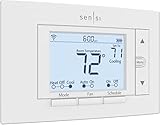
1. Sensi Smart Thermostat, 100 Years Of Expertise, Wi-Fi, Data Privacy, Programmable, Easy DIY Install, Works With Alexa, Energy Star Certified, Mobile App, ST55
Overview:
The Sensi Smart Thermostat delivers reliable, privacy-focused climate control for most standard HVAC systems. Backed by Emerson’s legacy, it emphasizes user control and energy efficiency without requiring a C-wire in most installations, making it ideal for straightforward DIY upgrades from traditional thermostats.
What Makes It Stand Out:
Sensi prioritizes data privacy by explicitly not selling user information—a rare commitment in the smart home space. Its ENERGY STAR certification promises ~23% HVAC energy savings via flexible scheduling and remote access. The intuitive physical interface mimics conventional thermostats, avoiding wall damage during installation, while built-in maintenance alerts (like filter reminders) enhance long-term HVAC health.
Value for Money:
Competitively priced for its feature set, Sensi offers strong value by eliminating professional installation costs (thanks to no C-wire needs) and delivering measurable energy savings. Though lacking advanced integrations like Matter, it outperforms budget thermostats in privacy and ease of use, justifying its cost for simplicity-focused homeowners.
Strengths and Weaknesses:
Strengths: No C-wire required; exceptional privacy policy; simple DIY install; ENERGY STAR savings; maintenance tracking.
Weaknesses: Limited smart home ecosystem compatibility (Alexa-only); basic app interface; no geofencing or room sensors.
Bottom Line:
A top choice for privacy-conscious users seeking an easy, cost-effective smart thermostat upgrade with reliable energy savings—skip if you demand deep smart home integration or geofencing.
2. meross Smart Thermostat for Home, WiFi Thermostat Works with Matter, Alexa, Apple Home, Google Assistant, App & Voice Control, 7x24h Scheduling, Energy Saving, C-Wire Required

Overview:
The meross Smart Thermostat targets tech-savvy users with robust Matter protocol support, enabling seamless local control across Apple Home, Alexa, and Google ecosystems. It suits 95% of HVAC systems but mandates C-wire verification before purchase, emphasizing compatibility and cross-platform flexibility.
What Makes It Stand Out:
Matter certification is its crown jewel, allowing unified control without cloud dependency—reducing latency and app clutter. The 7x24 scheduling offers granular temperature customization, while real-time energy usage tracking in the app helps optimize savings. Smart alerts for filter changes or system faults add proactive maintenance value.
Value for Money:
Priced accessibly for a Matter-enabled device, it delivers exceptional ecosystem versatility that future-proofs your setup. Rebates from energy providers (not included) enhance affordability. However, the C-wire requirement (and potential installation costs) may offset savings for older homes, making it best for newer installations.
Strengths and Weaknesses:
Strengths: Matter protocol support; broad voice assistant compatibility; detailed energy reports; flexible scheduling; real-time alerts.
Weaknesses: C-wire often required; incompatible with baseboard heaters; setup complexity for non-tech users.
Bottom Line:
Highly recommended for Matter adopters wanting reliable, multi-platform control and energy insights—verify C-wire compatibility first to avoid hidden costs.
3. Amazon Smart Thermostat – Save money and energy - Works with Alexa and Ring - C-wire required

Overview:
Amazon’s entry-level smart thermostat leverages Alexa integration to simplify temperature management, targeting users invested in Amazon’s ecosystem. It requires a C-wire and focuses on energy savings through utility rebates and automated routines, though it lacks advanced customization.
What Makes It Stand Out:
Automatic “comfort zones” using Echo devices or Amazon’s Air Quality Monitor adjust temperatures based on room presence—a unique convenience feature. Post-purchase rebate notifications (via email) streamline access to utility discounts, while Alexa’s auto-switching between home/away/sleep modes minimizes manual input.
Value for Money:
Its low upfront cost is amplified by ENERGY STAR’s estimated $50/year savings and potential utility rebates. However, the C-wire requirement adds installation expense for some, and limited third-party compatibility (beyond Alexa/Ring) reduces versatility compared to Matter-enabled rivals.
Strengths and Weaknesses:
Strengths: Strong Alexa/Ring synergy; effortless rebate access; simple auto-scheduling; ENERGY STAR certified.
Weaknesses: C-wire mandatory; no Matter/HomeKit support; basic scheduling; limited sensor integration.
Bottom Line:
Best for Alexa devotees seeking affordable, hands-off energy savings—opt for alternatives if you use Google/Apple ecosystems or need advanced scheduling.
4. Honeywell Home RTH8800WF2022, T5 WiFi Smart Thermostat, 7 Day-Programmable Touchscreen, Alexa Ready, Geofencing Technology, Energy Star, C-Wire Required

Overview:
Honeywell’s T5 Smart Thermostat combines a sleek touchscreen with geofencing and utility program integration, targeting users who prioritize precise scheduling and energy incentives. It requires a C-wire but promises 8–16% HVAC bill savings through disciplined usage.
What Makes It Stand Out:
Geofencing auto-adjusts temperatures based on smartphone location, while utility “Demand Response” enrollment can earn rewards during peak energy periods. Monthly energy reports and personalized efficiency tips in the app foster long-term savings habits, backed by ENERGY STAR certification.
Value for Money:
Mid-priced with strong utility rebate opportunities, the T5 justifies cost via geofencing convenience and potential cash incentives from energy providers. However, C-wire dependency and a steeper learning curve may deter beginners compared to plug-and-play models.
Strengths and Weaknesses:
Strengths: Geofencing precision; utility program rewards; detailed energy analytics; Alexa compatibility; 7-day scheduling.
Weaknesses: C-wire essential; complex setup; no Matter support; smaller touchscreen than competitors.
Bottom Line:
Ideal for tech-comfortable users wanting granular control and utility perks—prioritize if geofencing and rebate programs matter most.
5. ecobee Smart Thermostat Essential - Energy Star Certified programmable Wi-Fi Thermostat - Works with Siri, Alexa, and Google Assistant

Overview:
ecobee’s Essential model delivers broad voice assistant compatibility and robust energy savings for 85% of HVAC systems. It stands out with free software updates and optional room sensors (sold separately), though C-wire solutions add cost.
What Makes It Stand Out:
Room occupancy detection (via optional sensors) optimizes heating/cooling by focusing on occupied spaces—a rarity at this price. ENERGY STAR estimates 23% annual savings, while the vibrant touchscreen and ecobee app offer user-friendly control. Free firmware updates ensure longevity.
Value for Money:
Competitively priced despite requiring a separate Power Extender Kit (PEK) for no-C-wire homes. The 23% energy savings claim and multi-platform voice support (Siri/Google/Alexa) offer excellent ROI, though PEK costs (~$30) slightly reduce initial value.
Strengths and Weaknesses:
Strengths: Triple voice assistant support; occupancy-based efficiency; strong energy savings; free updates; easy app.
Weaknesses: PEK sold separately; no built-in room sensors; compatibility checker mandatory.
Bottom Line:
Highly recommended for multi-ecosystem households seeking future-proof efficiency—budget for the PEK if needed, but avoid if you skip room sensors.
6. Emerson Sensi Touch Wi-Fi Smart Thermostat with Touchscreen Color Display, Works with Alexa, Energy Star Certified, C-wire Required, ST75 Black 5.625" x 3.4" x 1.17"

Overview: The Emerson Sensi Touch is a premium ENERGY STAR-certified smart thermostat featuring a vibrant color touchscreen display. Designed for DIY installation in most standard HVAC systems (C-wire required), it offers remote control via smartphone and integrates with Alexa for voice commands, prioritizing user privacy and energy efficiency.
What Makes It Stand Out: Its standout feature is the large, intuitive color touchscreen with easy-to-read temperatures and menus, available in multiple colors to match décor. Combined with robust privacy guarantees (no third-party data sales) and proven energy-saving potential (estimated 23% HVAC savings), it delivers a premium, user-centric experience beyond basic thermostats.
Value for Money: Priced competitively within the mid-to-high tier, it justifies cost through its superior display, strong privacy stance, and reliable energy savings. While requiring a C-wire (a potential DIY hurdle), its long-term energy reduction and build quality offer better value than cheaper monochrome alternatives lacking its polish and features.
Strengths and Weaknesses: Strengths: Excellent color display, strong privacy policy, significant potential energy savings, easy app navigation, sleek design options. Weaknesses: Mandatory C-wire requirement complicates installation for some homes, slightly higher price point than basic models, limited smart home ecosystem depth compared to newer Matter devices.
Bottom Line: Highly recommended for users seeking a privacy-focused, visually appealing thermostat with proven energy savings and straightforward app control, provided their system has a C-wire; ideal for those prioritizing display quality and reliability over cutting-edge Matter integration.
7. Honeywell Home RTH6580WF Wi-Fi 7-Day Programmable Thermostat, White

Overview: The Honeywell Home RTH6580WF is a dependable, ENERGY STAR-certified Wi-Fi thermostat offering 7-day programmability. It provides remote control via Honeywell’s apps, integrates with major voice assistants, and features a simple backlit display, targeting users seeking reliable smart functionality without excessive complexity.
What Makes It Stand Out: Its key strength is Honeywell’s legacy of reliability and dual-app support (Total Connect Comfort and Honeywell Home), offering flexibility. The straightforward 7-day scheduling, big backlit display, and broad compatibility with Alexa, Google Assistant, and Cortana make it exceptionally user-friendly for traditional programmable thermostat users transitioning to smart home tech.
Value for Money: Positioned as a solid mid-range option, it delivers excellent value through Honeywell’s trusted brand, easy DIY setup, and genuine energy savings. While lacking a color screen or advanced features like geofencing, its focus on core programmability and seamless app/voice control justifies its price against similarly featured competitors.
Strengths and Weaknesses: Strengths: Very intuitive operation, reliable brand reputation, dual app choice, bright backlit display, broad voice assistant compatibility, simple DIY installation. Weaknesses: Basic monochrome display, no geofencing or advanced energy reports, limited smart home innovation compared to newer Matter thermostats, app interface can feel dated.
Bottom Line: A top recommendation for users prioritizing straightforward programmability, brand trust, and hassle-free voice/app control over advanced features; excellent value for those wanting dependable, energy-saving smart thermostat functionality without frills.
8. Sensi Lite Smart Thermostat, Programmable, WiFi, Easy DIY, Works With Alexa, ENERGY STAR Certified, ST25, Most Systems C-Wire Not Required, C-Wire needed with Heat/Cool Only & Heat Pump System – Black
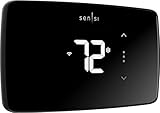
Overview: The Sensi Lite ST25 is a streamlined, ENERGY STAR-certified smart thermostat emphasizing ultra-easy DIY installation. Its major draw is compatibility with most systems without requiring a C-wire (except specific heat pump/heat-cool setups), offering core smart features like scheduling, remote access, and Alexa compatibility at an accessible price.
What Makes It Stand Out: The standout feature is eliminating the C-wire barrier for the vast majority of standard HVAC systems, significantly simplifying DIY installation. Combined with the same strong privacy policy and estimated 23% energy savings as its pricier sibling, it provides essential smart functionality with remarkable accessibility for renters or homeowners avoiding electrical work.
Value for Money: Offers exceptional value as one of the most budget-friendly true smart thermostats. The elimination of the C-wire requirement for most systems removes a major installation cost/complexity hurdle. While the display is basic, the core energy-saving features, app control, and privacy focus deliver significant bang for the buck compared to models requiring professional C-wire installation.
Strengths and Weaknesses: Strengths: No C-wire needed for most systems (huge plus), very easy DIY install, strong privacy commitment, significant potential energy savings, affordable price. Weaknesses: Requires C-wire for heat pumps/heat-cool systems (critical limitation), basic monochrome display, lacks geofencing found on higher-end Sensi models, app slightly less polished.
Bottom Line: Highly recommended, especially for users with standard HVAC systems lacking a C-wire; the best value pick for accessible, privacy-conscious smart thermostat functionality with proven energy-saving potential, provided your system compatibility is confirmed.
9. meross Smart Thermostat for Home, WiFi Thermostat Works with Matter, Alexa, Apple Home, Google Assistant, App & Voice Control, 7x24h Scheduling, Energy Saving, C-Wire Required

Overview: The meross Smart Thermostat is a Matter-compatible Wi-Fi thermostat designed for broad 24V HVAC system compatibility (excluding baseboards). It emphasizes seamless integration across ecosystems (Apple Home, Alexa, Google), detailed scheduling, energy monitoring, and smart alerts, targeting users invested in a multi-platform smart home.
What Makes It Stand Out: Its primary differentiator is Matter certification, enabling local, secure control across Apple Home, Alexa, Google Home, and SmartThings simultaneously without ecosystem lock-in. The robust 24/7 scheduling, detailed energy usage tracking, and proactive system alerts (filter, malfunctions) provide comprehensive home management beyond basic temperature control.
Value for Money: Offers strong value for Matter adopters seeking future-proof compatibility. While requiring a C-wire, its ability to unify control across major platforms eliminates the need for multiple thermostats or complex bridges. The energy monitoring and scheduling features provide tangible utility, justifying its position as a versatile, long-term smart home investment.
Strengths and Weaknesses: Strengths: True Matter support for cross-platform harmony, excellent energy usage tracking, detailed scheduling, useful smart alerts, wide 24V HVAC compatibility, affordable Matter entry point. Weaknesses: C-wire required (limiting for some), build quality feels less premium than Emerson/Honeywell, Matter setup can be initially complex for novices, not for baseboard heaters.
Bottom Line: A compelling recommendation for users building a Matter-based smart home who want unified thermostat control across Apple, Alexa, and Google ecosystems; ideal for tech-savvy homeowners prioritizing interoperability and energy insights over premium materials.
10. meross Matter Smart Thermostat for Electric Baseboard Heater, Works with Alexa, HomeKit, Google, SmartThings, Programmable WiFi Thermostat for House, Energy Saving, App & Voice Control for Smart Home
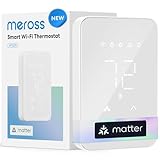
Overview: This meross thermostat is a specialized solution exclusively designed for high-voltage (120-240V) electric heating systems like baseboards, convector, and fan-forced heaters. It brings Matter compatibility, scheduling, energy monitoring, and unique features like Open Window Detection to a segment often neglected by standard smart thermostats.
What Makes It Stand Out: It uniquely caters to electric baseboard heating systems – a critical niche where most smart thermostats fail. Features like Open Window Detection (automatically pauses heating) and precise high-voltage energy monitoring are tailored specifically for electric heat efficiency. Matter support ensures broad smart home integration (Apple Home, Alexa, Google, SmartThings).
Value for Money: Provides exceptional, niche-specific value. For baseboard heater users, compatible smart thermostats are rare and often expensive. This model delivers essential smart features (scheduling, remote control, Matter integration) plus energy-saving innovations like Open Window Detection at a competitive price, making it indispensable for its target audience.
Strengths and Weaknesses: Strengths: Purpose-built for electric baseboards (120-240V), Matter compatibility across ecosystems, Open Window Detection saves energy, detailed electricity monitoring, affordable for its niche. Weaknesses: Only for high-voltage electric heat (useless for standard 24V HVAC/AC), limited physical presence (relies on app), niche applicability means it’s irrelevant for most homes.
Bottom Line: An essential recommendation only for homes using electric baseboard, convector, or fan-forced heaters; unmatched value and functionality within its specific domain, but irrelevant for conventional HVAC systems – verify your heater type before considering.
Understanding Wi-Fi Thermostats and Energy Efficiency
How Wi-Fi Connectivity Transforms Temperature Control
The core power of these devices lies in their constant internet connection. This isn’t just about adjusting the temperature from your phone while stuck in traffic (though that’s handy!). It enables features like automatic software updates for improved algorithms, seamless integration with utility demand-response programs, and the ability to gather detailed energy usage reports over time. Real-time data becomes the foundation for smarter, more efficient operation.
The Learning Curve: Adaptive Scheduling Explained
Gone are the days of rigid, pre-programmed schedules that rarely match real life. Many advanced models utilize adaptive learning. By observing your manual adjustments over a period (usually a week or two), the thermostat identifies patterns in your preferred temperatures for different times of day and days of the week. It then creates a personalized schedule that optimizes energy use without sacrificing comfort, automatically entering energy-saving modes when you’re typically away or asleep.
Geofencing: Your Location, Your Thermostat’s Trigger
Geofencing leverages the GPS in your smartphone to create a virtual boundary around your home. When your phone (and thus, you) leaves this geofenced area, the thermostat automatically switches to an energy-saving mode. Conversely, as you head back home, it begins adjusting the temperature to your preferred setting, ensuring comfort upon arrival without wasting energy heating or cooling an empty house. It’s like having an invisible assistant managing your HVAC based on your actual whereabouts.
Key Features to Prioritize for Maximum Savings
Compatibility: The Non-Negotiable Starting Point
Before getting excited about features, verifying compatibility with your existing HVAC system is absolutely critical. This involves checking your current thermostat wiring, particularly the presence of a common wire (C-wire). While some newer models can work without one, a C-wire provides consistent power, enabling all features (like a vibrant display and constant Wi-Fi connectivity) to function reliably. Mismatched compatibility leads to frustration and wasted money – always consult compatibility tools or an HVAC professional first.
Precision Sensors: Beyond the Thermostat Location
Basic thermostats only measure temperature where they’re mounted, which might not reflect conditions in other rooms. Look for models offering remote room sensors. These small devices, placed in key areas (like a frequently used living room or a sun-drenched bedroom), provide more accurate, whole-home temperature data. The main thermostat then uses this information to balance heating or cooling, preventing the system from overworking to satisfy a sensor in an unnaturally hot or cold spot.
Energy Usage Reports and Insights
True energy savers provide more than just control; they offer understanding. Comprehensive energy reports break down your heating and cooling usage by day, week, or month. Some even compare your usage to similar homes or provide historical trends. Identifying spikes in consumption or understanding how weather impacts your system empowers you to make informed adjustments to your schedule or habits for further savings.
Utility Rebates and Demand Response Programs
Many utility companies actively encourage energy efficiency and offer significant rebates for installing qualifying smart thermostats. Furthermore, participating in utility demand-response programs allows your thermostat to automatically make minor, temporary adjustments during periods of peak grid demand (often in exchange for bill credits). These programs collectively reduce strain on the grid and can translate directly into lower costs for you, making the thermostat pay for itself faster.
Installation and Setup Considerations
DIY vs. Professional Installation: Weighing the Options
While many Wi-Fi thermostats are designed for confident DIYers with clear instructions and wiring diagrams, the complexity varies. If your system is older, lacks a C-wire, or has intricate multi-stage heating/cooling, professional installation is highly recommended. An HVAC technician ensures correct wiring, optimal placement (away from drafts, direct sunlight, or heat sources), and proper system communication, preventing malfunctions that could negate any potential energy savings.
Optimal Placement for Accurate Readings
Where you mount the thermostat significantly impacts its performance. Avoid locations near windows, exterior doors, lamps, TVs, or other heat sources/sinks. It should be on an interior wall, at average room height, in a frequently occupied living area. Incorrect placement can cause the thermostat to misread the home’s actual temperature, leading the HVAC system to run unnecessarily long cycles – the exact opposite of energy savings.
Integrating with Your Existing Smart Home Ecosystem
Consider how the thermostat fits into your broader smart home. Does it work seamlessly with your preferred voice assistant (like Alexa or Google Assistant) for voice control? Does it integrate with other smart devices (like smart vents or occupancy sensors) through a central hub or platform (like Apple HomeKit, Samsung SmartThings, or IFTTT)? A well-integrated thermostat can trigger broader energy-saving routines, such as turning down the heat when smart locks detect everyone has left.
Maximizing Your Energy Savings Potential
Crafting Realistic Schedules Based on Lifestyle
Even with learning capabilities, manually reviewing and fine-tuning the schedule is beneficial. Be honest about your typical wake-up, leave-for-work, return-home, and bedtime patterns. Setting aggressive energy-saving temperatures only during times you are consistently away or asleep yields the best results. Small, consistent adjustments (like setting it 7-10 degrees lower while asleep or away for 8 hours) compound significantly over time.
Leveraging Vacation Mode Effectively
Going on an extended trip? Don’t just leave the thermostat at a comfortable setting. Engage the dedicated vacation mode. This sets the system to a much wider, energy-conserving temperature range (e.g., 55°F in winter, 85°F in summer) to prevent pipe freezing or extreme humidity without running the system unnecessarily. Some models even allow you to adjust vacation settings remotely if plans change.
Understanding and Utilizing Weather Compensation
Advanced thermostats incorporate local weather forecasts. On a mild spring day, it might delay turning on the furnace if the sun is expected to warm the house naturally. Conversely, if a cold front is imminent, it might start heating a bit earlier to maintain comfort without a sudden, energy-intensive blast. This proactive adjustment prevents the system from reacting too late or too aggressively to changing outdoor conditions.
Long-Term Value and Maintenance
Software Updates: The Key to Evolving Savings
Treat your smart thermostat like any other connected device – updates are crucial. Manufacturers regularly release firmware updates that can improve learning algorithms, enhance compatibility, add new energy-saving features, or patch security vulnerabilities. Ensure your thermostat is connected to Wi-Fi consistently to receive these updates automatically, maximizing its long-term efficiency potential.
Monitoring System Health Alerts
Many Wi-Fi thermostats provide basic HVAC system diagnostics. They can alert you to issues like unusually long run times (indicating a potential airflow problem or failing component), filter change reminders, or communication errors with the HVAC system. Catching minor problems early through these alerts can prevent major breakdowns and ensure your system operates at peak efficiency, which is fundamental to saving energy.
Calculating Your Real-World Payback Period
While upfront cost is a factor, focus on the return on investment. Factor in any available utility rebates, which can substantially reduce the net cost. Then, estimate potential savings based on your climate, energy rates, and usage patterns (many manufacturers provide calculators). Most homeowners see a payback period of 1-2 years through reduced energy bills, after which the savings are pure profit for the lifespan of the thermostat.
Frequently Asked Questions
How much can I realistically save on my energy bills with a Wi-Fi thermostat?
Savings vary based on climate, home size, current usage, and how effectively you use the features, but industry studies and utility data consistently show average savings of 10-12% on heating and 15% on cooling costs annually, translating to significant dollars over time.
Do I absolutely need a C-wire for a Wi-Fi thermostat?
While some models can function without a C-wire using alternative power methods (like퀵 charging the internal battery), having a C-wire is highly recommended. It ensures reliable power for the display, Wi-Fi connectivity, and all advanced features without unexpected shutdowns, especially during extreme weather.
Can a smart thermostat work with any type of HVAC system?
Compatibility is key. Most work with standard forced-air systems (gas, electric, oil), heat pumps (including dual-fuel), and some radiant systems. However, systems with complex wiring (like older millivolt systems or certain commercial setups) may not be compatible. Always check the manufacturer’s compatibility tool before purchasing.
Is the learning feature truly effective, or is manual scheduling better?
Learning features are generally very effective for establishing a baseline schedule based on observed behavior. However, manually reviewing and tweaking the learned schedule to reflect your actual desired comfort periods often yields the optimal balance between comfort and savings. Think of learning as a helpful starting point, not a set-it-and-forget-it solution.
How does geofencing actually save energy compared to a simple schedule?
Schedules are static and assume you leave/return at exact times, which rarely happens perfectly. Geofencing dynamically adjusts based on your actual location. If you leave work early, it starts saving energy immediately. If you’re stuck late, it avoids cooling/heating an empty house for hours. This responsiveness eliminates the energy waste inherent in rigid schedules.
Will participating in utility demand-response programs damage my HVAC system?
No. These programs involve very minor, temporary temperature adjustments (usually 2-4 degrees) for short durations (typically 1-4 hours) during peak demand events. Modern HVAC systems are designed to handle these fluctuations easily, and the thermostat ensures adjustments are within safe operating parameters.
How often should I change my HVAC filter when using a smart thermostat?
Smart thermostats often include filter change reminders based on runtime hours. However, the standard recommendation remains every 1-3 months, depending on filter type, pets, and air quality. A clean filter is crucial for system efficiency and airflow; ignoring it negates thermostat savings and can damage your system.
Can a Wi-Fi thermostat help prevent frozen pipes in winter?
Yes, strategically. While vacation mode sets a lower temperature, you can set a minimum “frost protection” temperature (usually around 55°F). The thermostat will then activate the heat only if temperatures drop near that threshold, using minimal energy to prevent freezing, unlike leaving the heat set high while away.
Are there security risks with a Wi-Fi connected thermostat?
Like any internet-connected device, there is a potential risk. Mitigate this by choosing reputable brands with a strong security track record, using a strong, unique password for your home Wi-Fi network, keeping the thermostat’s firmware updated, and considering placing it on a separate network VLAN if your router supports it.
How long do Wi-Fi thermostats typically last before needing replacement?
Most quality Wi-Fi thermostats are designed to last 7-10 years, similar to traditional programmable thermostats. Factors like power surges, extreme humidity, or frequent software issues can shorten lifespan. Regular software updates help maintain functionality and security throughout its expected life.
See Also
- Stop Wasting Energy with the 10 Best Energy Saving Thermostats This Year
- How to Optimize Energy Savings with Learning Smart Thermostats
- Stop Wasting Energy with the 10 Best Programmable Thermostats This Year
- The 10 Best WiFi Thermostats Every Tech-Savvy Renter Needs This Year
- 10 Best WiFi Thermostats for Energy Saving in 2026