Table of Contents
Imagine staring at your monthly energy bill, wondering where all that money vanishes. You know your old thermostat is part of the problem – clunky, imprecise, and offering zero insight. The promise of a smart WiFi thermostat is tempting: remote control, energy savings, and modern convenience. But the thought of complex wiring, confusing apps, or shelling out hundreds for something that might not even work with your existing system? That’s enough to make anyone hesitate. You want value that’s real, not just a low sticker price, and installation that doesn’t require calling in a professional or rewiring your entire house. Finding that sweet spot between affordability, ease of setup, and genuine long-term benefits feels like searching for a needle in a haystack.
Let’s cut through the noise. The best value in a WiFi thermostat isn’t always the cheapest upfront model, nor is it necessarily the flashiest gadget packed with features you’ll never use. True value lies in a seamless blend of straightforward installation, reliable performance, meaningful energy-saving potential, and an intuitive interface that you’ll actually use day after day. For the average homeowner tackling this project themselves in 2026, avoiding costly mistakes and hidden frustrations is paramount. This guide cuts through marketing hype to focus squarely on what you need to know to choose a thermostat that delivers real savings without the headache, ensuring your investment pays off from day one through years of efficient operation.
Top 10 WiFi Thermostats for Easy Installation
Detailed Product Reviews
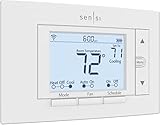
1. Sensi Smart Thermostat, 100 Years Of Expertise, Wi-Fi, Data Privacy, Programmable, Easy DIY Install, Works With Alexa, Energy Star Certified, Mobile App, ST55
Overview:
The Sensi Smart Thermostat (ST55) combines decades of HVAC expertise with modern smart-home integration. Designed for effortless DIY installation without typically requiring a C-wire, it targets homeowners seeking energy savings and remote control via Wi-Fi and Alexa compatibility, all while prioritizing data privacy.
What Makes It Stand Out:
Sensi’s standout features include robust privacy protection—explicitly refusing to sell user data—and ENERGY STAR certification promising ~23% HVAC energy savings. Its intuitive physical buttons mimic traditional thermostats, avoiding wall damage during installation, while smart maintenance tools deliver usage reports and filter-change alerts.
Value for Money:
Competitively priced against premium smart thermostats, the ST55 justifies its cost through significant energy savings potential, no subscription fees, and broad HVAC compatibility. The inclusion of utility rebate eligibility and a polished mobile app adds tangible value over basic programmable models.
Strengths and Weaknesses:
Strengths: C-wire not needed for most systems; strong privacy policy; easy retrofit installation; detailed energy reports; Alexa/app control.
Weaknesses: Geofencing requires app use (not built-in); advanced scheduling less customizable than competitors; no color screen.
Bottom Line:
An excellent privacy-focused entry for DIY installers seeking reliable energy savings and seamless smart-home integration without C-wire hassles. Highly recommended for standard HVAC systems prioritizing simplicity and data security.
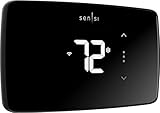
2. Sensi Lite Smart Thermostat, Programmable, WiFi, Easy DIY, Works With Alexa, ENERGY STAR Certified, ST25, Most Systems C-Wire Not Required, C-Wire needed with Heat/Cool Only & Heat Pump System – Black
Overview:
The Sensi Lite (ST25) delivers core smart-thermostat functionality at a streamlined price point. It retains key features like ENERGY STAR efficiency and Alexa compatibility but simplifies design for cost-conscious users, with specific C-wire requirements for certain HVAC setups.
What Makes It Stand Out:
Sensi Lite distinguishes itself with identical privacy assurances as its premium sibling—no data selling or ad targeting—and the same ~23% energy-saving potential. Its built-in level and app-guided DIY installation make setup accessible, while the top-rated mobile app enables robust remote control.
Value for Money:
Offering 90% of the ST55’s functionality at a lower cost, the ST25 excels for users with compatible systems (no C-wire needed for most). Energy savings quickly offset the price, though heat-pump owners must budget for C-wire installation if absent.
Strengths and Weaknesses:
Strengths: Affordable entry to Sensi’s ecosystem; strong privacy; intuitive app; DIY-friendly; ENERGY STAR certified.
Weaknesses: C-wire mandatory for heat pumps/heat-cool-only systems; lacks physical buttons (touchscreen only); no usage reports or geofencing.
Bottom Line:
A budget-friendly, privacy-respecting smart thermostat ideal for straightforward HVAC systems. Best for renters or owners seeking basic remote control and energy savings without advanced analytics—verify C-wire needs first.
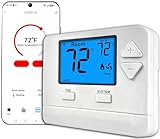
3. WiFi Thermostats for Home Single-Stage 1Heat/ 1Cool, APP Remote Control, 7-Day or 0-Day Programmable. (C-Wire Required)
Overview:
This no-frills smart thermostat targets single-stage HVAC systems (1H/1C), emphasizing remote app control and flexible scheduling. Its rigid requirement for a C-wire underscores a focus on reliability for compatible setups, positioning it as a functional but limited option.
What Makes It Stand Out:
Simplicity defines this model: dedicated 7-day programmability lets users tailor daily schedules precisely, while the mandatory C-wire ensures stable power—avoiding battery-related shutdowns common in budget thermostats. The app interface prioritizes straightforward temperature management.
Value for Money:
Priced accessibly, it offers solid value only for single-stage systems with an existing C-wire. Savings come from scheduling efficiency, but the lack of ENERGY STAR certification or utility integrations limits long-term ROI compared to certified alternatives.
Strengths and Weaknesses:
Strengths: Reliable power via C-wire; easy 7-day scheduling; simple app interface; affordable upfront cost.
Weaknesses: C-wire strictly required (no flexibility); no geofencing or usage reports; incompatible with multi-stage/heat pumps; no voice assistant support.
Bottom Line:
A dependable basic thermostat for single-stage systems with a C-wire, but its inflexibility and missing smart features make it hard to recommend over ENERGY STAR models unless budget is the absolute priority.
4. Honeywell Home RTH9585WF1004 Wi-Fi Smart Color Thermostat, 7 Day Programmable, Touch Screen, Energy Star, Alexa Ready, Gray

Overview:
Honeywell’s RTH9585WF merges aesthetics with utility, featuring a customizable color touchscreen and ENERGY STAR certification. It targets homeowners wanting personalized style, utility rebates, and broad HVAC compatibility beyond basic forced-air systems.
What Makes It Stand Out:
The vibrant color screen—adjustable to match décor—is unique at this tier. Demand Response Program integration lets utilities offer rebates for minor temperature adjustments during peak demand, while compatibility spans forced-air, hot water, steam, and heat pumps (excluding baseboard).
Value for Money:
Justified by utility rebates, demand-response savings, and professional-grade compatibility, this thermostat pays for itself faster in eligible regions. The color screen and intuitive touch interface add premium value over monochrome competitors.
Strengths and Weaknesses:
Strengths: Customizable color display; utility rebate eligibility; wide HVAC compatibility; bright touchscreen; ENERGY STAR certified.
Weaknesses: C-wire mandatory; no battery backup; incompatible with electric baseboard heat; app less polished than Sensi’s.
Bottom Line:
A top choice for style-conscious users with compatible systems seeking utility savings and a premium interface. Essential for homes with hot water/steam heating—prioritize checking HVAC compatibility before buying.
5. New! Honeywell Home Smart Thermostat, Conventional/Heat Pump Compatibility, WiFi Thermostat for Home, X2S, Gray

Overview:
Honeywell’s X2S thermostat (RTH2CWF) bridges conventional and heat-pump systems with Matter certification for future-proof smart-home integration. It emphasizes customization, energy programs, and humidity monitoring within a robust ENERGY STAR framework.
What Makes It Stand Out:
Matter + Apple HomeKit/Google/Alexa support ensures broad ecosystem compatibility, while unique features like 32°F low-heat setpoints and humidity display cater to climate-specific needs. Flexible scheduling (5-1-1, 5-2, 7-day, or non-programmable) adapts to any routine.
Value for Money:
The price reflects premium Matter certification and exceptional HVAC versatility (2H/2C conventional or 2H/1C heat pump). Energy program participation and filter reminders enhance savings, though the C-wire requirement may add installation costs.
Strengths and Weaknesses:
Strengths: Matter certified; heat-pump/conventional dual compatibility; humidity monitoring; flexible scheduling; utility demand-response ready.
Weaknesses: C-wire essential; app occasionally glitchy; no color screen; setup complex for non-tech users.
Bottom Line:
An ideal upgrade for heat-pump owners or smart-home enthusiasts needing Matter support. Delivers exceptional versatility and energy tools—confirm C-wire availability and HVAC compatibility for seamless adoption.
6. ecobee Smart Thermostat Essential - Energy Star Certified programmable Wi-Fi Thermostat - Works with Siri, Alexa, and Google Assistant

Overview: The ecobee Smart Thermostat Essential is an Energy Star-certified Wi-Fi thermostat designed to optimize home heating and cooling efficiency. It learns schedules, integrates with major voice assistants, and focuses on user-friendly energy savings without requiring a common wire (C-wire) in most installations. What Makes It Stand Out: Its standout feature is compatibility with 85% of HVAC systems, even without a C-wire (using the optional PEK adapter), making DIY installation more accessible. Free software updates ensure long-term relevance, while precise room sensors (sold separately) and detailed energy tracking via the app provide tailored comfort insights beyond basic scheduling. Value for Money: Priced competitively, it delivers strong value through verified energy savings of up to 23% annually. While the PEK and trim kit are extra costs for C-wire-less setups, the core unit’s efficiency, robust app, and broad compatibility justify its cost compared to basic programmable thermostats. Strengths and Weaknesses: Strengths: Excellent energy-saving potential, intuitive touchscreen/app, no C-wire needed (with PEK), strong voice assistant support. Weaknesses: Essential lacks room sensors included (a key ecobee feature in pricier models), and the PEK adds cost for some installations. Bottom Line: A highly capable, future-proof thermostat ideal for energy-conscious users seeking easy installation and significant savings; the Essential is a smart investment for most homes despite minor add-on costs for specific setups.
7. Honeywell Home RTH6580WF Wi-Fi 7-Day Programmable Thermostat, White

Overview: The Honeywell Home RTH6580WF is a straightforward, Energy Star-certified Wi-Fi thermostat offering 7-day programmability and remote control. It emphasizes simplicity, reliability, and seamless integration into existing smart home ecosystems with its clear display and user-focused design. What Makes It Stand Out: Its standout feature is exceptional ease of use, highlighted by a large, backlit display and intuitive physical buttons alongside app control. Compatibility with multiple voice assistants (Alexa, Google, Cortana) and two dedicated apps (Total Connect Comfort & Honeywell Home) provides flexible access without complexity. Value for Money: Positioned as a mid-range option, it offers excellent value for users prioritizing reliability and simplicity over advanced automation. The robust build quality, proven Honeywell performance, and Energy Star certification make it a cost-effective upgrade from manual thermostats, outperforming cheaper Wi-Fi models in durability. Strengths and Weaknesses: Strengths: Superb ease of use, bright display, reliable app connectivity, strong voice assistant support, Energy Star certified. Weaknesses: Lacks advanced features like learning capabilities or detailed energy reports found in premium smart thermostats; app experience can feel dated. Bottom Line: A top choice for users seeking a no-fuss, dependable Wi-Fi thermostat with excellent core functionality and wide smart home compatibility; ideal for those valuing simplicity over cutting-edge automation.
8. Emerson Sensi Touch Wi-Fi Smart Thermostat with Touchscreen Color Display, Works with Alexa, Energy Star Certified, C-wire Required, ST75 Black 5.625" x 3.4" x 1.17"

Overview: The Emerson Sensi Touch is a sleek, Energy Star-certified smart thermostat featuring a vibrant color touchscreen. It focuses on user-friendly design, privacy-conscious operation, and significant energy savings through remote access and scheduling, requiring a C-wire for installation. What Makes It Stand Out: Its standout elements are the modern, customizable color display and a strong privacy commitment—Sensi explicitly states it won’t sell user data. The easy DIY installation process, aided by an in-app level and illuminated terminals, coupled with ENERGY STAR-verified 23% potential savings, enhances its appeal. Value for Money: Offering premium aesthetics and privacy assurances at a mid-tier price, it provides solid value. While the C-wire requirement might necessitate minor electrical work for some, the intuitive app, proven energy savings, and robust build quality make it a worthwhile upgrade over basic programmable models. Strengths and Weaknesses: Strengths: Beautiful color display, strong privacy policy, easy DIY install (with C-wire), proven energy savings, sleek design options. Weaknesses: Mandatory C-wire limits retrofit ease for older homes; lacks advanced features like geofencing or room sensors. Bottom Line: Highly recommended for style-conscious users with compatible systems who prioritize privacy and straightforward energy savings; a visually appealing and reliable smart thermostat choice.
9. meross Smart Thermostat for Home, WiFi Thermostat Works with Matter, Alexa, Apple Home, Google Assistant, App & Voice Control, 7x24h Scheduling, Energy Saving, C-Wire Required

Overview: The meross Smart Thermostat is a Matter protocol-compatible Wi-Fi device designed for broad HVAC system support (95%), including heat pumps. It emphasizes local Matter integration, detailed scheduling, and energy monitoring, requiring a C-wire for most installations. What Makes It Stand Out: Its key differentiator is seamless Matter support, enabling local, fast control within Apple Home, Alexa, Google Home, and SmartThings ecosystems without constant cloud reliance—reducing app overload. Comprehensive smart alerts (filter life, malfunctions) and granular 7x24 scheduling add significant utility. Value for Money: Positioned affordably, it delivers exceptional value for Matter ecosystem users seeking a unified smart home experience. The local processing, robust scheduling, and HVAC usage tracking offer premium features at a competitive price, though compatibility checks are essential pre-purchase. Strengths and Weaknesses: Strengths: Leading Matter integration for local control, detailed scheduling/alerts, wide HVAC compatibility (95%), affordable, strong energy tracking. Weaknesses: C-wire required; compatibility excludes baseboard heaters; Matter setup might confuse absolute beginners. Bottom Line: An outstanding choice for tech-savvy users invested in Matter-compatible platforms, offering future-proof local control and rich features at a great price; verify HVAC compatibility first.
10. SASWELL Smart Thermostat 3H/2C, WiFi Household Thermostat for Heat Pump and Conventional Multi-Stage System, Easy DIY Installation, Voice Control, Support Alexa and Google Home, C-Wire Required

Overview: The SASWELL Smart Thermostat targets homes with complex HVAC setups, specifically supporting heat pumps and multi-stage conventional systems. It offers app control, voice assistant integration, and a color touchscreen, requiring a C-wire for reliable operation. What Makes It Stand Out: Its primary strength is specialized compatibility with advanced systems like heat pumps (3H/2C configuration), which many budget thermostats overlook. Tight integration with Tuya/Smart Life apps alongside Google/Alexa, plus a responsive color touch interface, caters well to Tuya ecosystem users. Value for Money: For heat pump owners, it offers compelling value by providing essential smart features (scheduling, remote control, voice) at a typically lower price point than Ecobee or Honeywell heat pump models. The DIY focus keeps installation costs down if a C-wire exists. Strengths and Weaknesses: Strengths: Excellent heat pump/multi-stage support, affordable, easy Tuya/Smart Life integration, bright color screen, 7-day scheduling. Weaknesses: C-wire mandatory; Tuya reliance may deter non-users; app/interface less polished than premium brands. Bottom Line: A highly recommended, cost-effective solution specifically for heat pump or multi-stage system owners within the Tuya ecosystem; less ideal for those avoiding Tuya or lacking a C-wire.
Understanding True Value in a Smart Thermostat
When shopping for a WiFi thermostat, it’s crucial to move beyond the initial purchase price. True value encompasses the entire ownership experience, impacting your wallet and daily life long after installation.
Beyond the Price Tag: Calculating Long-Term Savings
The upfront cost is just the beginning. Consider the thermostat’s potential to reduce your heating and cooling bills – often cited as saving 10-12% annually through optimized scheduling and geofencing. A slightly higher-priced unit that integrates seamlessly with your system and encourages efficient habits can yield significant returns. Factor in potential utility rebates, which are increasingly common for qualifying energy-efficient models, further offsetting the initial cost. Durability matters too; a thermostat built to last 10+ years avoids the hassle and expense of premature replacement.
The Hidden Cost of Complexity
A thermostat marketed as “smart” but burdened with a confusing interface or unreliable app becomes a source of frustration, not savings. If you struggle to program it or it frequently disconnects from WiFi, you won’t utilize its features, negating any potential energy benefits. Value includes intuitive usability – clear menus, logical scheduling, and a responsive app that makes managing your home comfort effortless. A model that’s simple enough for everyone in the household to use correctly delivers consistent savings.
Reliability: The Unseen Value Driver
Nothing erodes value faster than a thermostat that crashes, loses settings, or fails to communicate with your HVAC system. Consistent, reliable operation is non-negotiable. Look for models known for stable firmware and robust WiFi connectivity. Frequent updates from the manufacturer to patch bugs or add features also contribute to long-term reliability and value, ensuring your device stays functional and secure for years.
Mastering the Installation Process
The promise of DIY installation is a major draw, but it’s only valuable if the process is genuinely manageable. Understanding what makes installation “easy” is key to avoiding project abandonment or costly errors.
Demystifying Wiring: Is Your System Compatible?
The single biggest factor in easy installation is compatibility with your existing wiring. Most homes have a standard low-voltage (24V) system with common wires (R, C, Y, G, W). The critical question is: Do you have a C-wire (Common wire)? This powers the thermostat constantly. While some newer models can work without one using power-stealing technology or an add-on kit, having a C-wire significantly simplifies setup and ensures stable operation, especially for features like continuous WiFi. Check your old thermostat’s wiring before purchasing a new one.
Tools and Prep: Setting Yourself Up for Success
Don’t underestimate the importance of preparation. You’ll need basic tools: a small screwdriver, wire strippers, possibly a label maker or masking tape for marking wires, and a smartphone or tablet for setup. Turn off power to your HVAC system at the breaker before starting. Take a clear photo of your old thermostat’s wiring configuration. Having the manufacturer’s compatibility checker (usually online) and printed installation guide handy is essential. This prep work prevents mid-installation panic and mistakes.
Step-by-Step Simplicity: What “Easy” Really Looks Like
A truly easy installation guide features clear, step-by-step instructions with large, well-lit photos or diagrams for every wiring step. The physical mounting should be straightforward – a simple base plate that attaches securely to the wall. Wiring terminals should be clearly labeled and easy to access. The best guides anticipate common pitfalls (like identifying the C-wire) and provide troubleshooting tips specific to wiring scenarios. The app setup should guide you through connecting to WiFi and linking the thermostat with minimal technical jargon.
Essential Features for Practical Value
Not all smart features are created equal when seeking genuine value. Focus on capabilities that directly translate to savings, convenience, and ease of use in your daily life.
Intuitive Scheduling That Actually Gets Used
Forget overly complex programming menus. Look for scheduling that adapts to your life: easy-to-set “away” modes, simple daily/weekly schedules, and preferably, adaptive learning that observes your patterns without being intrusive. The ability to adjust the schedule effortlessly via the app or a clean touchscreen interface ensures you’ll maintain optimal settings, maximizing energy savings without constant manual tweaking.
Geofencing: Automatic Comfort Without the Effort
Geofencing uses your smartphone’s location to automatically switch the system to “Away” mode when you leave and begin adjusting the temperature before you return. This feature eliminates the “did I forget to turn it down?” anxiety and provides effortless energy savings. Ensure the implementation is reliable and battery-friendly for your phone, avoiding constant location pings that drain your device.
Clear Energy Usage Reports and Insights
Value comes from understanding your consumption. Look for thermostats that provide straightforward reports – not just raw data, but actionable insights. Did running the AC constantly on weekends spike your bill? Is your heating system working harder than expected? Clear, easy-to-interpret feedback helps you identify habits to change and verify that the thermostat is delivering real savings, justifying its cost.
Connectivity and Ecosystem Considerations
Your thermostat doesn’t exist in a vacuum. How it connects and integrates impacts both daily usability and long-term value.
Rock-Solid WiFi Reliability is Non-Negotiable
Frequent disconnects render remote control and geofencing useless. Prioritize models known for stable 2.4 GHz WiFi connectivity (most smart thermostats don’t support 5 GHz). Check user reviews specifically mentioning WiFi stability over weeks or months. A thermostat that constantly drops off the network frustrates users and negates core smart features, making it poor value regardless of price.
Voice Assistant Compatibility: Convenience Factor
Integration with popular voice assistants (like Alexa or Google Assistant) adds a layer of hands-free convenience for quick temperature adjustments. While not essential for core value, it enhances the user experience if you already use these platforms. Ensure compatibility is straightforward and works reliably within your existing smart home setup.
Future-Proofing with Open Standards
As smart home technology evolves, consider thermostats supporting broader platforms like Matter over Thread. While not critical for immediate installation, this can enhance future compatibility with a wider range of hubs and devices, potentially extending the useful life of your investment and avoiding obsolescence as your smart home grows.
Safety and Professional Guidance
Even with “easy” DIY claims, safety and knowing when to call a pro are vital components of a valuable installation experience.
Electrical Safety: Never Compromise
Working with HVAC wiring involves low-voltage circuits, but mistakes can still damage your expensive furnace or air handler. Always turn off power at the main electrical panel before touching any wires. Double-check with a multimeter if you’re unsure. If your wiring looks frayed, undersized, or you encounter unexpected configurations (like line-voltage systems for older baseboard heaters), stop immediately. Electrical safety isn’t an area for guessing games.
Recognizing When DIY Isn’t the Best Value
Installing a thermostat seems simple, but complexities arise. If your system lacks a C-wire and the add-on kit instructions seem daunting, if you have a multi-stage or heat pump system with complex wiring (O/B, Aux, E wires), or if you simply feel uncomfortable at any point, calling a licensed HVAC technician is the smarter financial decision. The cost of a professional install ($75-$150 typically) is minor compared to the potential cost of damaging your HVAC system, which could run into thousands. True value includes peace of mind.
Warranty Implications: Protecting Your Investment
Most manufacturers honor warranties regardless of DIY or professional install, as long as the installation follows their instructions and doesn’t damage the unit. However, if an improper DIY install damages your HVAC system, your HVAC warranty might be voided. Check both the thermostat warranty terms and your HVAC system warranty details. Professional installation often provides an additional layer of assurance for your entire system.
Maximizing Your Investment Post-Installation
Getting it up and running is just the start. True value is realized through consistent, optimized use over time.
Fine-Tuning Settings for Optimal Savings
Don’t just set it and forget it. Periodically review the schedule. Are the “away” temperatures set efficiently? Is the system running unnecessarily during the middle of the day when the house is empty? Adjust setback temperatures gradually – even a few degrees makes a difference. Experiment with fan settings (e.g., “Circulate” mode for even temps vs. “Auto”). Small tweaks based on actual usage patterns maximize the savings potential.
Leveraging Software Updates
Manufacturers often release firmware updates that improve performance, add minor features, or fix bugs. Ensure your thermostat is set to update automatically (usually the default). These updates can enhance stability, refine algorithms for better energy savings, or improve compatibility, effectively adding value to your existing hardware over time without any extra cost.
Understanding Your System’s Capabilities
A smart thermostat can’t overcome fundamental HVAC limitations. If your furnace is ancient and inefficient, or your ductwork is leaky, the thermostat can only optimize within those constraints. Pairing your new thermostat with other efficiency measures (like sealing ducts or adding insulation) creates a synergistic effect, where the thermostat’s value in managing your improved system becomes even more significant.
Frequently Asked Questions
Frequently Asked Questions
Do I absolutely need a C-wire for a WiFi thermostat?
While many modern thermostats offer solutions like power-stealing technology or add-on kits to work without a C-wire, having one is highly recommended. It ensures consistent power for the thermostat’s display, WiFi connectivity, and features, preventing potential issues like intermittent operation or drained batteries, especially during extreme weather.
How can I tell if my HVAC system is compatible before buying?
Use the manufacturer’s online compatibility checker tool – it’s the most reliable method. You’ll typically need to know your system type (gas furnace, heat pump, oil, etc.) and count/label the wires connected to your current thermostat (take a clear photo first!). Standard systems (most common) with 24V wiring and common wires (R, C, Y, G, W) are generally compatible.
Are the energy savings claims realistic for most homes?
Yes, significant savings (typically 10-15% on heating/cooling bills) are achievable, but they depend heavily on correct setup and usage. Simply installing the thermostat isn’t enough; you must utilize features like scheduling, geofencing, and maintaining appropriate temperature setbacks. Savings are maximized when the thermostat complements other home efficiency measures.
Can a DIYer safely install one, or should I hire a pro?
Most standard installations on common low-voltage systems are very DIY-friendly with careful preparation and adherence to instructions. However, if you lack a C-wire and the add-on seems complex, have a heat pump/multi-stage system, feel unsure about electrical safety, or encounter unexpected wiring, calling an HVAC professional is the safer and ultimately more valuable choice to avoid costly damage.
Will I need a subscription to use the basic smart features?
Reputable thermostat brands typically do not require subscriptions for core functionality: local control, basic scheduling, remote access via the app, and geofencing. Subscriptions, if offered, are usually for advanced analytics, extended weather forecasts, or professional service monitoring – features you can often live without for core value.
How important is the mobile app experience?
Crucially important for realizing the thermostat’s full value. A poor app (glitchy, slow, unintuitive) discourages regular use of remote features and energy reports. Prioritize models with highly-rated, stable apps on your smartphone platform (iOS/Android) that make adjusting settings and viewing data effortless.
What’s the biggest mistake people make after installing a smart thermostat?
Not setting up or utilizing the scheduling and geofencing features effectively. Many install it but leave it in manual mode constantly, negating the primary energy-saving benefits. Take the time during setup to create a realistic schedule and ensure geofencing is enabled and working correctly for automatic “away” modes.
Can a smart thermostat work with very old HVAC systems?
It depends on the wiring. If your old system uses standard 24V low-voltage control wiring (common in systems from the 1980s onward), compatibility is likely. Truly ancient systems (e.g., millivolt gas wall heaters, line-voltage baseboard) are generally incompatible with standard WiFi thermostats and require specific, often non-smart, replacements.
How long do these thermostats typically last?
Quality smart thermostats are designed for a lifespan of 7-10 years or more. Factors like stable power (having a C-wire helps), firmware updates from the manufacturer, and protection from extreme environmental conditions (like direct sunlight or excessive humidity) contribute to longevity. They generally outlast basic programmable thermostats.
Are there security concerns with WiFi thermostats?
Like any internet-connected device, there’s a potential risk. Mitigate this by choosing reputable brands known for strong security practices and regular firmware updates. Always use a strong, unique password for your home WiFi network and the thermostat account, and ensure your home router’s firmware is up-to-date. Avoid using the thermostat on an unsecured network.
See Also
- 10 Best Value Touchscreen Thermostats for Easy Installation in 2026
- 10 Best Remote Controls for Thermostats for Seniors with Easy-to-Use Interfaces in 2026
- 10 Best WiFi Thermostats for Energy Savings This Year
- 10 Best Value Touchscreen Thermostats for Small Apartments in 2026
- 10 Best Value Learning Thermostats for Long-Term Savings in 2026