Table of Contents
Imagine coming home to a perfectly warm living room on a frosty winter evening, or stepping into a refreshingly cool bedroom after a sweltering summer day – without ever lifting a finger. For many seniors, this level of comfort and convenience isn’t just a luxury; it’s a critical component of independent living, health management, and overall well-being. Maintaining a stable, comfortable indoor environment directly impacts sleep quality, helps manage chronic conditions like arthritis, and significantly reduces the physical strain of constantly adjusting thermostats. Yet, the promise of smart home technology often feels out of reach for older adults, overshadowed by fears of complicated setups, confusing interfaces, or devices that demand constant attention. The reality is that the right smart thermostat can be a powerful ally, promoting safety, comfort, and peace of mind without adding frustration.
Navigating the world of smart thermostats as a senior, or for someone helping a senior parent or grandparent, requires focusing on simplicity, reliability, and features that genuinely enhance daily life. It’s not about the most advanced AI or the flashiest display; it’s about intuitive controls that work with you, not against you. Forget tiny touchscreens or buried menu options – the ideal solution prioritizes ease of use above all else, ensuring temperature adjustments are effortless, whether through a clear physical dial, straightforward voice commands, or a generously sized, high-contrast app. This guide cuts through the marketing noise to focus squarely on the essential considerations that make a smart thermostat truly suitable and beneficial for the senior experience, empowering informed decisions that prioritize comfort, safety, and effortless control.
Top 10 Smart Thermostats for Seniors
Detailed Product Reviews
1. Sensi Smart Thermostat, 100 Years Of Expertise, Wi-Fi, Data Privacy, Programmable, Easy DIY Install, Works With Alexa, Energy Star Certified, Mobile App, ST55
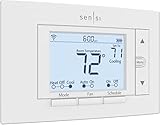
Overview: The Sensi ST55 is an ENERGY STAR-certified smart thermostat prioritizing privacy and straightforward installation. It integrates Wi-Fi connectivity for remote control via mobile app, supports Alexa voice commands, and emphasizes user-friendly DIY setup without requiring a common wire (C-wire) in most systems.
What Makes It Stand Out: Sensi’s standout feature is its strict privacy policy—explicitly refusing to sell user data. Its intuitive physical interface mimics traditional thermostats, avoiding wall damage during installation. Flexible scheduling, HVAC usage reports, and proactive maintenance alerts (like filter reminders) enhance usability while promoting energy efficiency.
Value for Money: Priced competitively, it delivers robust functionality without hidden costs. The ENERGY STAR certification promises ~23% HVAC energy savings, and its universal compatibility eliminates expensive professional installation fees for most users, outperforming basic programmable thermostats.
Strengths and Weaknesses: Strengths: No C-wire needed, exceptional privacy focus, clear app interface, and HVAC monitoring. Weaknesses: Lacks Apple HomeKit/Siri support, and usage reports are less detailed than premium competitors like Nest.
Bottom Line: Ideal for privacy-conscious users seeking hassle-free installation and reliable energy savings; a highly accessible entry into smart thermostats without compromising core functionality.
2. New! Honeywell Home Smart Thermostat, Conventional/Heat Pump Compatibility, WiFi Thermostat for Home, X2S, Gray

Overview: The Honeywell Home X2S is a Matter-certified Wi-Fi thermostat compatible with conventional and heat pump systems. It offers app-based remote control, flexible scheduling, and integrates with Alexa, Google Assistant, and Apple HomeKit (via Matter).
What Makes It Stand Out: Its Matter certification ensures future-proof interoperability across ecosystems. Unique features include humidity monitoring, extended low-heat setpoint (32°F), and demand-response readiness for utility rebates. Customizable scheduling (5-1-1, 7-day, etc.) caters to diverse routines.
Value for Money: While requiring a C-wire (potentially adding installation costs), its broad compatibility and utility rebate eligibility justify the price. ENERGY STAR certification supports long-term savings, though the 2-year warranty lags behind competitors offering lifetime coverage.
Strengths and Weaknesses: Strengths: Matter/Apple HomeKit support, humidity tracking, and flexible scheduling. Weaknesses: Mandatory C-wire complicates DIY installs, and the app interface is less intuitive than rivals.
Bottom Line: A solid choice for multi-ecosystem homes needing heat pump support and humidity control, but verify C-wire compatibility first to avoid extra expenses.
3. Amazon Smart Thermostat – Save money and energy - Works with Alexa and Ring - C-wire required

Overview: Amazon’s thermostat leverages Alexa integration to automate temperature adjustments based on presence detection from Echo devices or Smart Air Quality Monitors, positioning itself as an energy-saving upgrade from traditional models.
What Makes It Stand Out: Unique “comfort zones” use Echo devices to adjust temps room-by-room. Direct rebate coordination via email post-purchase simplifies accessing energy provider incentives. Alexa’s automatic mode shifts between home/away/sleep settings seamlessly.
Value for Money: ENERGY STAR claims ~$50/year savings, but the mandatory C-wire may incur installation fees. Rebate assistance offsets the upfront cost, though limited third-party compatibility (Ring only) reduces versatility versus Matter-enabled rivals.
Strengths and Weaknesses: Strengths: Seamless Alexa integration, comfort zones, and rebate guidance. Weaknesses: C-wire requirement, no Google/Apple support, and fewer HVAC diagnostics than competitors.
Bottom Line: Best for Alexa-centric households prioritizing automated presence detection; ensure C-wire availability to maximize cost efficiency.
4. ecobee Smart Thermostat Essential - Energy Star Certified programmable Wi-Fi Thermostat - Works with Siri, Alexa, and Google Assistant

Overview: The ecobee Essential supports Siri, Alexa, and Google Assistant, targeting broad smart-home compatibility. ENERGY STAR certified, it promises up to 23% annual savings and includes remote app control with energy usage tracking.
What Makes It Stand Out: Its 85% system compatibility (via online checker) and optional Power Extender Kit (sold separately) solve C-wire issues. The color touchscreen and free software updates ensure long-term relevance, while occupancy-based scheduling optimizes energy use.
Value for Money: Competitive pricing for triple-voice-assistant support. The PEK add-on cost for C-wire-less homes slightly dents value, but ENERGY STAR savings and robust app features justify the investment versus single-ecosystem thermostats.
Strengths and Weaknesses: Strengths: Universal voice assistant support, easy DIY install (with PEK), and detailed energy reports. Weaknesses: PEK not included, and display customization lags behind premium ecobee models.
Bottom Line: A versatile, future-proof option for multi-assistant households; budget for the PEK if lacking a C-wire.
5. Google Nest Thermostat - Smart Thermostat for Home - Programmable Wifi Thermostat - Snow

Overview: The Nest Thermostat emphasizes simplicity and energy savings with auto-scheduling, remote control, and ENERGY STAR certification. It targets effortless installation (C-wire optional for most systems) and deep Google Home integration.
What Makes It Stand Out: “Savings Finder” proactively suggests schedule tweaks for extra efficiency. Auto-away mode adjusts temps based on phone location, while the clean design fits most wall cutouts. Google’s ecosystem integration enables nuanced routines via the Home app.
Value for Money: Strong long-term value with lifetime warranty and utility rebates. Though slightly pricier, its learning capabilities and energy insights typically yield higher savings than basic programmables, offsetting costs over time.
Strengths and Weaknesses: Strengths: Intuitive learning features, Savings Finder, and no C-wire needed for many systems. Weaknesses: Limited heat pump customization and no physical scheduling buttons.
Bottom Line: A top pick for Google ecosystem users seeking autonomous energy management; ideal for renters or DIYers valuing simplicity and proven savings.
6. meross Smart Thermostat for Home, WiFi Thermostat Works with Matter, Alexa, Apple Home, Google Assistant, App & Voice Control, 7x24h Scheduling, Energy Saving, C-Wire Required

Overview:
The meross Smart Thermostat offers robust connectivity for modern smart homes, focusing on compatibility with Matter protocol and major voice assistants. Designed for 95% of HVAC systems (excluding baseboard heaters), it requires a C-wire for certain setups and emphasizes energy tracking via its app.
What Makes It Stand Out:
Its seamless Matter integration enables local control without cloud dependency, reducing latency and app overload across Apple Home, Alexa, and Google ecosystems. The 24/7 scheduling adapts to routines while detailed energy usage reports help optimize HVAC costs. Smart alerts for filter changes and system issues add proactive maintenance.
Value for Money:
Priced competitively, it delivers exceptional value for Matter adopters seeking unified smart home control. While C-wire requirements may necessitate minor installation tweaks, the long-term energy savings and compatibility breadth outpace basic Wi-Fi thermostats, justifying its cost over non-Matter alternatives.
Strengths and Weaknesses:
Strengths: Future-proof Matter support; comprehensive scheduling; detailed energy analytics; multi-platform voice control. Weaknesses: C-wire mandatory for some systems; incompatible with electric baseboard heaters; app interface less intuitive than rivals.
Bottom Line:
Ideal for tech-savvy users investing in Matter ecosystems, this thermostat balances advanced automation with energy savings. Verify C-wire compatibility first—otherwise, it’s a top-tier pick for holistic smart home integration and efficiency.
7. Sensi Lite Smart Thermostat, Programmable, WiFi, Easy DIY, Works With Alexa, ENERGY STAR Certified, ST25, Most Systems C-Wire Not Required, C-Wire needed with Heat/Cool Only & Heat Pump System – Black
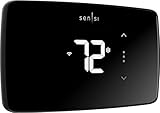
Overview:
The Sensi Lite Smart Thermostat prioritizes user-friendly installation and ENERGY STAR-certified efficiency. It works with most HVAC systems, often without a C-wire, and offers remote control via a top-rated app while emphasizing privacy.
What Makes It Stand Out:
Its standout feature is C-wire flexibility—unnecessary for many standard systems—simplifying DIY installation. The ENERGY STAR certification promises ~23% energy savings through geofencing and usage reports. Privacy-conscious users will appreciate its strict policy against selling data or using activity for ads.
Value for Money:
An excellent budget-friendly option, it undercuts premium thermostats while delivering core smart features. The no-C-wire advantage for common systems saves installation costs, and energy savings quickly offset the upfront price compared to non-programmable models.
Strengths and Weaknesses:
Strengths: Hassle-free DIY setup; no C-wire needed for most systems; strong privacy protections; reliable app; ENERGY STAR savings. Weaknesses: C-wire required for heat pumps; lacks advanced sensors; geofencing less precise than competitors.
Bottom Line:
A superb entry-level choice for homeowners wanting simplicity, privacy, and solid energy savings. If your system avoids heat pumps, the Sensi Lite offers unmatched ease and value for straightforward smart climate control.
8. Honeywell Home RTH6580WF Wi-Fi 7-Day Programmable Thermostat, White

Overview:
Honeywell’s RTH6580WF blends classic reliability with modern Wi-Fi connectivity. This ENERGY STAR-certified thermostat features a 7-day programmable schedule, broad voice assistant compatibility, and a user-friendly interface designed for DIY installation.
What Makes It Stand Out:
Its intuitive operation shines with a large backlit display and straightforward controls—ideal for users wary of complex tech. Dual app support (Honeywell Home and Total Connect Comfort) ensures flexibility, while seamless integration with Alexa, Google, and Cortana enhances accessibility.
Value for Money:
Positioned as a mid-range option, it provides dependable performance without premium pricing. The ENERGY STAR efficiency and easy self-installation deliver tangible savings, making it a cost-effective upgrade from manual thermostats despite lacking cutting-edge features like occupancy sensors.
Strengths and Weaknesses:
Strengths: Extremely user-friendly display; simple DIY install; dual app options; ENERGY STAR efficiency; broad voice assistant support. Weaknesses: No advanced automation (e.g., geofencing); basic scheduling only; fewer smart integrations than Matter-enabled rivals.
Bottom Line:
Perfect for users prioritizing simplicity and reliability over advanced automation. If you want hassle-free programming, clear visibility, and solid energy savings without tech complexity, the Honeywell RTH6580WF is a trustworthy workhorse.
9. vine Smart Thermostat for House, WiFi Thermostats for Home Compatible with Alexa and Google Assistant, 7day x 8period Programmable, Energy Star Certified, C-Wire Required

Overview:
The vine Smart Thermostat targets compatibility and customization, supporting 90% of 24V HVAC systems with rigorous pre-purchase QR code verification. It requires a C-wire and offers granular 7-day/8-period scheduling via dual apps.
What Makes It Stand Out:
Its standout feature is the mandatory pre-purchase compatibility scan via QR code, minimizing installation surprises. The 7-day x 8-period scheduling allows hyper-customized temperature routines, while Auto Home/Away mode and filter-change alerts enhance convenience and efficiency.
Value for Money:
Competitively priced, it offers strong value through precise scheduling and Energy Star certification. The dual-app support (Vine and Smart Life) adds flexibility, though C-wire dependency may increase installation effort. Savings from tailored programming justify the cost for detail-oriented users.
Strengths and Weaknesses:
Strengths: Pre-purchase compatibility check; highly customizable scheduling; dual-app control; Energy Star certified; useful alerts (filter/temp). Weaknesses: C-wire always required; Smart Life app feels dated; limited Matter/HomeKit support.
Bottom Line:
Choose the vine thermostat if meticulous scheduling and upfront compatibility assurance are priorities. It’s a functional, energy-efficient option for non-Matter homes, though tech enthusiasts may prefer more integrated ecosystems.
10. ecobee Smart Thermostat Enhanced - Programmable Wifi Thermostat - Works with Siri, Alexa, Google Assistant - Energy Star Certified - Smart Home

Overview:
Ecobee’s Enhanced Smart Thermostat leverages radar-based occupancy sensing and machine learning for adaptive comfort. Compatible with 90% of systems, it includes a Power Extender Kit (PEK) for C-wire-free installs and promises up to 26% annual savings.
What Makes It Stand Out:
Built-in radar occupancy detection preheats/cools homes before arrival—a unique feature absent in competitors. It learns schedules, adjusts for humidity, and integrates deeply with Apple HomeKit (via Siri). The included PEK simplifies installation across diverse HVAC setups.
Value for Money:
Priced higher but justified by advanced automation: radar sensing and learning algorithms maximize comfort and savings. The included PEK and Trim Kit eliminate extra costs, while 26% claimed savings (vs. 23% for Sensi) deliver strong ROI for energy-conscious households.
Strengths and Weaknesses:
Strengths: Radar occupancy sensing; PEK included; learns preferences; humidity adjustment; exceptional HomeKit support. Weaknesses: Premium price; radar may误trigger; complex setup for novices.
Bottom Line:
Worth the investment for those seeking cutting-edge automation and seamless Apple ecosystem integration. The ecobee Enhanced excels in personalized comfort and long-term savings, making it a top-tier choice despite its higher cost.
Understanding Core Needs for Senior Users
Prioritizing Interface Simplicity and Accessibility
The single most crucial factor is how easily the thermostat can be operated. Look for models featuring large, physical buttons or a prominent, responsive dial that provides clear tactile feedback – eliminating the guesswork of touchscreens that might be unresponsive with less precise finger movements. High-contrast displays with large, bold fonts are non-negotiable for users with declining vision, ensuring temperature settings and modes are instantly readable without straining. Avoid interfaces buried under multiple layers of menus; essential functions like adjusting the temperature up or down, switching between heating and cooling, and setting a temporary hold should be accessible with one or two simple actions directly on the device itself.
Accommodating Physical Dexterity and Vision Limitations
Smart thermostats must be designed with reduced dexterity in mind. Consider the physical placement on the wall; it should ideally be installed at a comfortable height, avoiding awkward reaches or bends. The size and spacing of any physical controls matter significantly – buttons need to be large enough to press confidently and spaced sufficiently to prevent accidental activation of adjacent functions. For visual clarity, backlighting that automatically adjusts to ambient light levels is a major plus, ensuring the display remains visible day or night. Some models offer companion apps specifically designed with accessibility features like zoom functionality and screen reader compatibility, which can be invaluable if the user is comfortable with smartphone technology.
Minimizing Cognitive Load and Complexity
The goal is effortless interaction, not constant learning. A senior-friendly thermostat should operate predictably with minimal steps required for daily adjustments. Complex scheduling setups that require navigating numerous digital submenus are counterproductive. Instead, prioritize thermostats that learn basic routines effortlessly through simple manual adjustments over a few days, or offer extremely straightforward one-touch scheduling options (like “Away” or “Sleep” modes activated by a single large button). The system should provide clear, unambiguous feedback – a distinct beep, a visible indicator light, or a simple voice confirmation – so the user knows their command was registered without doubt.
Essential Smart Features That Deliver Real Value
Voice Control Integration for Hands-Free Operation
Seamless integration with widely used, simple voice assistants (like those built into common smart speakers or displays) is transformative. Being able to simply say, “Hey [Assistant], set the temperature to 72 degrees,” eliminates the need to walk to the thermostat or fumble with an app. This is particularly beneficial for individuals with limited mobility or during periods of fatigue. Ensure the voice commands required are natural and straightforward, avoiding overly specific or complex phrasing that’s easy to forget. Reliability is key – the voice system must consistently understand commands in a typical home environment.
Remote Access with a Senior-Friendly Companion App
While the physical thermostat is primary, a well-designed mobile app offers crucial flexibility for caregivers or tech-savvy family members. However, the app itself must be exceptionally simple. It should prominently feature large, clear temperature adjustment sliders or buttons, a straightforward display of the current temperature and mode (heat/cool/off), and easy-to-find “Away” or “Home” settings. Avoid apps cluttered with advanced energy reports or complex geofencing setups unless those features can be easily hidden. The primary purpose for remote access should be basic temperature adjustment and checking status, not managing intricate systems.
Automated Scheduling Based on Simple Routines
The true “smart” benefit lies in effortless automation that aligns with natural daily rhythms. Instead of demanding users program specific times for weekdays vs. weekends, look for thermostats that quickly learn preferred temperatures through consistent manual adjustments. Does the user always turn it down 2 degrees after breakfast? The thermostat should notice and incorporate that. Alternatively, very simple “Good Morning,” “Away,” “Home,” and “Sleep” modes activated by one physical button or voice command provide significant comfort and energy savings without complexity. The schedule should adapt easily if routines change, without requiring a complete reprogramming session.
Safety, Health, and Peace of Mind Features
Critical Alerts for Extreme Temperatures
Unexpected temperature extremes inside the home pose serious health risks, especially for seniors who may be less sensitive to gradual changes. A valuable feature is the thermostat’s ability to send immediate, clear alerts to a family member’s phone if the indoor temperature falls dangerously low (risking hypothermia) or rises excessively high (risking heat exhaustion), particularly when the home is supposed to be occupied. These alerts should be actionable, specifying the current temperature and location, enabling swift intervention.
Integration with Broader Home Safety Systems
Consider how the thermostat might work within a larger, simple safety ecosystem. Can it automatically trigger a bright light sequence or a distinct alarm sound (through a connected smart speaker) if freezing temperatures are detected, providing an immediate in-home warning? While full integration with medical alert systems is less common, compatibility with basic smart home hubs that can relay critical alerts (like low temperature warnings) to designated contacts adds a significant layer of security and reassurance for both the senior and their loved ones.
Supporting Health Management Through Environmental Control
Stable indoor temperatures are vital for managing many age-related health conditions. Consistent warmth can alleviate arthritis stiffness, while avoiding overheating is crucial for cardiovascular health. A thermostat that reliably maintains the set temperature without wide swings contributes directly to physical comfort and symptom management. Some advanced systems might even offer gentle reminders (via voice or a simple app notification) to check on hydration during heatwaves, though core temperature stability remains the most fundamental health-supporting feature.
Practical Installation and Setup Considerations
Compatibility with Existing HVAC Systems
Before any purchase, verifying compatibility is essential. Most modern smart thermostats work with common single-stage or multi-stage heating and cooling systems, but older homes might have unique setups like high-voltage electric baseboard heating, heat pumps requiring specific wiring (like O/B terminals), or systems lacking a common “C” wire for continuous power. A missing C-wire can often be addressed with an included adapter kit, but confirming compatibility upfront prevents frustrating installation hurdles. Don’t assume – check the manufacturer’s compatibility tool using your current thermostat’s wiring.
Ease of Physical Installation Process
While professional installation is always an option (and often recommended for wiring complexities), a senior-friendly thermostat should ideally be straightforward for a handy individual or local technician to install. Look for clear, step-by-step wiring diagrams with large, labeled photos in the manual, color-coded wiring terminals that match standard HVAC conventions, and a mounting plate that simplifies connecting wires before attaching the thermostat face. Avoid models requiring obscure tools or extremely tight wire connections in cramped electrical boxes. A clean, simple installation process reduces stress and potential errors.
Initial Setup and Wi-Fi Connection Simplicity
The first-time setup experience sets the tone. Connecting to Wi-Fi should be intuitive, ideally using a smartphone app with a clear QR code scan or simple network selection process – avoiding the need to manually enter complex Wi-Fi passwords on the thermostat itself via a tiny interface. The initial configuration should focus solely on essential settings: location (for weather-based features), time zone, and basic temperature preferences. Advanced features like energy reports or complex geofencing should be optional extras that can be explored later, not mandatory steps during the initial, potentially overwhelming setup phase.
Cost, Value, and Long-Term Viability
Understanding Upfront Investment vs. Long-Term Savings
Smart thermostats represent an upfront cost beyond a basic unit, but the potential value lies in both comfort/convenience and energy savings. While precise savings vary, the ability to automatically reduce heating or cooling when the home is empty (via “Away” mode or simple scheduling) can lead to noticeable reductions on utility bills over time, particularly in climates with significant heating or cooling needs. It’s important to weigh the initial purchase price against these potential long-term operational savings and the immense non-financial value of enhanced comfort, safety, and peace of mind.
Evaluating Subscription Requirements and Hidden Costs
Be vigilant about potential ongoing costs. While the core temperature control and basic scheduling features of most reputable thermostats should work without any subscription, some advanced features like detailed energy usage reports, extended weather forecasts, or certain voice assistant integrations might require a monthly or annual fee. Scrutinize the product details to understand exactly what functionality is included permanently with the purchase and what might incur future charges. For senior-focused simplicity, prioritize thermostats where all essential comfort and safety features operate without mandatory subscriptions.
Assessing Device Longevity and Software Support
A smart thermostat is a long-term investment in the home. Research the manufacturer’s track record for providing regular, seamless software updates that maintain compatibility with evolving voice assistants, smart home platforms, and security protocols. Outdated software can lead to features breaking or, more seriously, security vulnerabilities. Choose a brand known for committing to several years of firmware updates, ensuring the device remains functional, secure, and integrated with your home ecosystem well into the future, avoiding the need for premature replacement.
Future-Proofing for Evolving Needs
Compatibility with Expanding Smart Home Ecosystems
While starting simple is wise, consider if the thermostat connects to a widely adopted smart home platform (like Matter over Thread, or major ecosystems like Apple HomeKit, Google Home, or Amazon Alexa). This doesn’t mean diving into complex automations now, but it ensures that if, down the line, a simple motion sensor is added to trigger “Away” mode more reliably, or a smart plug is used for a space heater, the thermostat can potentially integrate smoothly without requiring a complete system overhaul. Open standards provide flexibility for gentle, future expansion.
Adapting to Changing Mobility or Health Needs
The ideal thermostat should remain useful even as needs evolve. Strong voice control ensures usability if walking to the device becomes difficult. Remote access via a simple app allows a family member to assist with adjustments if needed, without requiring a physical visit. Features like temperature alerts become even more critical if the senior lives alone and experiences reduced mobility or awareness. Choosing a system with these robust, foundational capabilities built-in means it can continue to provide value and safety as circumstances change, rather than becoming obsolete.
The Importance of Reliable Customer Support
When questions arise – and they will, especially during initial setup – accessible and patient customer support is invaluable. Look for manufacturers offering clear support channels: comprehensive online FAQs and video tutorials specifically addressing common setup issues, phone support with reasonable wait times, and ideally, support agents trained to explain concepts clearly without technical jargon. Knowing help is available and understanding how to access it reduces anxiety about adopting new technology and ensures minor hiccups don’t derail the entire experience.
Frequently Asked Questions
Frequently Asked Questions
How difficult is it for a senior to install a smart thermostat themselves? Installation complexity varies, but many modern models are designed for DIY with clear instructions and wiring guides. However, if the existing wiring is confusing, a C-wire is missing (though adapters often help), or there’s discomfort working with electrical components, professional installation by an HVAC technician or electrician is highly recommended for safety and peace of mind. Don’t struggle unnecessarily.
Can a smart thermostat really save money on energy bills for someone who is home most of the time? Yes, even for seniors home during the day, savings are possible. Automatically lowering the heat slightly while sleeping or raising the AC setpoint when napping can add up. More significantly, if the person occasionally leaves for appointments or errands, the “Away” mode prevents heating or cooling an empty house. Consistent scheduling avoids manual overrides that lead to wasted energy.
What if my internet goes out? Will the thermostat still work? Absolutely. Smart thermostats function as basic programmable thermostats when disconnected from Wi-Fi. You can still adjust the temperature manually using the physical controls on the device. Remote access and voice control via the internet will be unavailable until the connection is restored, but core heating and cooling operation remains under your direct control.
Are the voice control features reliable and easy to use with common accents? Most major voice assistants (Alexa, Google Assistant, Siri) have become quite adept at understanding diverse speech patterns and accents with regular use. Starting with simple, clear commands like “Set temperature to 70 degrees” works best. Reliability improves as the assistant learns the user’s voice. If initial accuracy is low, retraining the voice profile within the assistant’s app often helps significantly.
How secure are smart thermostats? Can someone else control my home’s temperature? Reputable brands implement strong security measures like data encryption and require secure login for remote access. The primary risk comes from using weak Wi-Fi passwords or reusing passwords across accounts. Always use a strong, unique password for your home Wi-Fi and the thermostat account. Enable two-factor authentication if the app offers it for an extra layer of security.
Do I need a smart speaker to use voice control, or can I talk directly to the thermostat? Most standalone smart thermostats do not have built-in microphones for direct voice control. They rely on integration with a separate smart speaker (like an Echo or Google Nest) placed in the same room. You speak to the speaker, which then communicates with the thermostat. A few premium models have built-in microphones, but a compatible speaker is the most common and often more reliable setup.
How often do I need to replace the batteries or worry about power? Smart thermostats designed for hardwired HVAC systems (the vast majority) draw power directly from your home’s heating/cooling system wiring and do not require batteries. They typically have a small internal backup battery to maintain settings during brief power outages, but this is not user-replaceable and lasts for the device’s lifetime. You won’t need to think about powering it.
Can a smart thermostat help if I have memory issues or forget to adjust the temperature? Definitely. This is a key benefit. Once a simple schedule is set (or learned by the thermostat), it automatically adjusts temperatures at the right times – like warming up before waking or cooling down before bedtime – without any action needed. Features like “Away” mode (triggered manually or sometimes by phone location) prevent heating/cooling an empty house, compensating for forgetfulness.
Is the mobile app really necessary, and can it be made simpler for someone not tech-savvy? The physical thermostat should handle all essential functions independently. The app is primarily for remote adjustments (e.g., warming the house before a grandchild visits) or initial setup. Many apps offer a “simple mode” or have interfaces that can be streamlined to show only the most critical controls (temperature adjustment, mode switch, away button), minimizing confusion. Family members can often manage the app complexity on the senior’s behalf.
What happens if the thermostat stops working correctly? Is it easy to revert to a basic thermostat? If a smart thermostat malfunctions, you can usually switch your HVAC system back to manual operation at the furnace/air handler’s control board (a temporary fix). However, for a permanent solution, you would need to remove the smart thermostat and reinstall a basic programmable or non-programmable thermostat. Keeping the original thermostat (if functional) as a backup is a wise precaution during the transition to smart technology.
See Also
- Why Voice-Controlled Smart Thermostats Are Revolutionizing Home Comfort in 2026
- 10 Best Remote Controls for Thermostats for Seniors with Easy-to-Use Interfaces in 2026
- 10 Best Budget Smart Thermostats Under $100 for First-Time Buyers
- 10 Expert-Recommended Smart Thermostats for Renters in 2026
- The 10 Best Learning Thermostats for Smart Homes in 2026