Table of Contents
Stepping into your dorm room for the first time, you’re quickly greeted by reality: those cinderblock walls and single windows create a microclimate that has nothing to do with the weather outside. Whether you’re battling late-August heat, dealing with radiators that won’t quit, or trying to sleep through your roommate’s preference for tropical temperatures, proper air circulation becomes non-negotiable for both comfort and academic success. The right portable fan transforms from a mere appliance into your personal climate control system, white noise generator, and sanity preservation tool—all while respecting the strict power consumption and space limitations that define dorm living.
By 2026, portable fan technology has evolved far beyond the noisy plastic boxes of previous generations. Today’s models offer whisper-quiet operation, app-controlled scheduling, and battery life that can last through an entire night of studying (or a full weekend when the power mysteriously goes out). But with countless options featuring everything from air purification integration to customizable LED displays, how do you identify what actually matters for your specific dorm situation? This comprehensive guide cuts through the marketing fluff to examine the essential features, design considerations, and practical factors that will help you select the perfect air-moving companion for your college journey.
Top 10 Portable Fans for Dorm Rooms
Detailed Product Reviews
1. Gaiatop Desk Fan, 5-Inch Portable Electric Table Desktop Air Circulator Fans, Small but Powerful with 3 Speed 360° Adjustable Tilt for Cooling Home Dorm Office Bedroom Bathroom Kitchen, Black

Overview: The Gaiatop 5-inch desk fan delivers impressive airflow in an ultra-compact 0.73-pound frame. This AC-powered circulator measures just 4.33×5.59×5.65 inches, making it ideal for cramped desks, nightstands, or kitchen counters. Its deep-pitched blade design propels air efficiently despite the diminutive size, serving as a personal cooling solution for targeted comfort rather than whole-room circulation.
What Makes It Stand Out: The 360° adjustable tilt offers exceptional directional control rare in this category, while the detachable front cover simplifies blade cleaning—a crucial maintenance feature. Operating at only 30dB, it’s genuinely whisper-quiet, and the 6.8-watt power consumption makes it remarkably energy-efficient. Four integrated rubber pads minimize vibration and prevent slipping on smooth surfaces.
Value for Money: Positioned in the budget-friendly segment, this fan delivers outstanding value under $25. It competes with basic Honeywell and Holmes models while offering superior adjustability and cleaning convenience. The negligible energy costs mean it pays for itself through utility savings during continuous summer operation, making it economically smart for daily desk use.
Strengths and Weaknesses: Strengths include minimal footprint, near-silent operation, tool-free maintenance, stability, and ultra-low power draw. Weaknesses are AC-only operation (no battery backup), limited 4.92-foot cord length, modest 23.6-foot coverage area, lack of remote control, and absence of timer functionality. The three-speed control is basic but functional.
Bottom Line: Perfect for personal cooling where space is premium, the Gaiatop excels in quiet environments like offices, dorm rooms, or bedside tables. While unsuitable for large spaces, its performance-to-size ratio and ease of cleaning make it an excellent choice for targeted, maintenance-friendly airflow.
2. TriPole Portable Standing Fan, 8000mAh Rechargeable Oscillating Fan with Remote, 8.1’’ Quiet Pedestal Floor Fan with LED Display & Timer, Foldable Small Desk Fans for Bedroom, Office, Camping, Travel

Overview: This versatile TriPole fan combines cordless convenience with telescopic adaptability, transforming from a 14.7-inch desk fan to a 34.4-inch floor pedestal. The built-in 8000mAh battery delivers 2.5 to 28.5 hours of operation depending on speed, while the LED display provides real-time battery, timer, and speed feedback. Its foldable design collapses to 4.17 inches for transport.
What Makes It Stand Out: The telescopic and foldable mechanism offers unmatched versatility for both indoor and outdoor use. The infrared remote controls all functions within 20 feet, and the 1-8 hour auto-shutoff timer prevents battery drain. With 90° oscillation and 180° vertical tilt, plus a brushless motor maintaining quiet operation at 4.9m/s max airflow, it adapts to any cooling scenario.
Value for Money: Priced in the $60-80 range, this fan justifies its premium through genuine portability and multi-functionality. Comparable battery-powered fans lack the telescopic feature, while traditional pedestals lack cordless operation. For campers, renters, or those wanting one fan for multiple locations, the investment eliminates need for separate units.
Strengths and Weaknesses: Pros include cordless freedom, exceptional battery life, height adjustability, remote convenience, quiet brushless motor, and compact storage. Cons involve higher upfront cost, inevitable battery degradation over 2-3 years, longer charging times versus instant AC power, and slightly less powerful airflow than corded competitors.
Bottom Line: An excellent choice for those prioritizing portability and versatility. It seamlessly transitions from office desk to camping tent to bedroom floor. While pricier than basic fans, its rechargeable flexibility and space-saving design make it worth every penny for mobile users or small apartments.
3. Dreo Fan for Bedroom, 12 Inches, 70ft Powerful Airflow, 28db Quiet Table Air Circulator Fans for Whole Room, 120° Adjustable Tilt, 3 Speeds, Desktop Fan for Home, Office, Kitchen

Overview: Dreo’s 12-inch circulator fan targets whole-room cooling with its proprietary WingBoost system, propelling air up to 70 feet. Standing 12 inches tall with an 11-inch width, this AC-powered unit moves beyond personal cooling to genuine air circulation. The NACA technology and bionic blade design optimize airflow while maintaining whisper-quiet 28dB operation, making it suitable for bedrooms and living spaces.
What Makes It Stand Out: The remarkable 70-foot throw distance rivals premium brands like Vornado at a fraction of the cost. The 120° adjustable tilt provides excellent vertical control, and the option for wall mounting adds installation flexibility. Its ability to enhance HVAC efficiency by pairing with AC, heaters, or purifiers creates year-round utility beyond simple cooling.
Value for Money: Positioned in the $35-45 range, this fan offers exceptional value for whole-room circulation technology. It undercuts premium circulators while delivering comparable airflow distance and quieter operation. The energy-saving potential through improved HVAC distribution provides ongoing cost benefits that offset the purchase price within a single season.
Strengths and Weaknesses: Advantages include outstanding airflow reach, ultra-quiet operation, versatile placement options, easy-clean detachable grille, and energy-efficient design. Drawbacks include lack of remote control, absence of timer functions, AC-only operation limiting placement, larger footprint than desk fans, and only three manual speed settings without precise adjustment.
Bottom Line: Ideal for those needing serious air circulation without premium pricing. It excels in bedrooms, living rooms, and offices where quiet, long-distance airflow matters. While it lacks smart features, its core performance and build quality make it a top contender for whole-room cooling on a budget.
4. Pelonis 3 Speed Small Room Air Circulator Fan with 7-inch Blade, Table Fan with 100° Adjustable Head Tilt - Desktop Fan for Bedroom,Dorm and Office - Ventilador for Air Conditioner and Heater, Black

Overview: Pelonis delivers a straightforward 7-inch circulator fan focused on no-frills performance. Measuring 6.88×10.82×10.94 inches, this AC-powered unit features a unique double airfoil blade design that maximizes airflow despite its compact footprint. With three speed settings and 100° tilt adjustment, it’s built for targeted cooling in small to medium rooms, particularly as a sleep aid for those who appreciate white noise.
What Makes It Stand Out: The explicit noise level specifications (38dB on low, 45dB on high) cater specifically to sleepers who want fan sound options. The double airfoil blade technology distinguishes it from standard flat-blade fans, creating more focused airflow. Its all-season marketing emphasizes year-round use with HVAC systems, though the 23.6-foot coverage is modest.
Value for Money: This fan typically retails under $30, positioning it as an entry-level circulator. It competes with basic Honeywell models but offers slightly more sophisticated blade engineering. For budget-conscious buyers wanting reliable performance without advanced features, it represents solid value, though newer competitors offer quieter operation for similar prices.
Strengths and Weaknesses: Strengths include honest noise-level transparency, stable base design, simple mechanical controls, decent power for size, and sleep-friendly sound profile. Weaknesses involve louder operation than premium options, limited coverage area, lack of remote or timer, AC-only power, and dated aesthetic design. The 100° tilt is less flexible than 360° competitors.
Bottom Line: A dependable budget circulator best suited for sleepers who want intentional fan noise and basic functionality. It works well in dorm rooms, small bedrooms, and offices where white noise is desirable. While not the quietest or most feature-rich, its honest performance and low price make it a worthy consideration for noise-seeking bargain hunters.
5. Uthfy 31 Inch Tower Fan for Bedroom, 120° Oscillating Quiet Standing Bladeless Fan With Remote, 7.5H Timer, 3 Speeds, 3 Modes, for Room, Dorm, Office, Black

Overview: Uthfy’s 31-inch bladeless tower fan prioritizes safety and silence in a sleek vertical design. The bladeless construction generates airflow through internal impellers, pushing air at 26ft/s while maintaining noise levels as low as 25dB. With 120° oscillation, three speeds, and three specialized modes, this AC-powered unit serves bedrooms and family spaces where finger-safe operation matters. The 7.5-hour timer offers 30-minute increments for precise overnight control.
What Makes It Stand Out: The bladeless design eliminates safety concerns for children and pets while enabling ultra-quiet operation. The hidden carry handle doubles as remote storage—a thoughtful detail preventing loss. UL certification with overload protection ensures electrical safety. The touch panel and 28-foot-range remote provide dual control convenience, while the compact 31-inch height fits easily in corners.
Value for Money: Priced competitively at $50-65, this tower fan undercuts Dyson-style bladeless models by hundreds while delivering core benefits. Compared to traditional oscillating towers, the safety premium adds value for families. The energy efficiency and timer functions contribute to operational savings that offset the moderate upfront cost within a year of regular use.
Strengths and Weaknesses: Pros include exceptional quietness, child-safe bladeless design, convenient remote storage, flexible timer, wide oscillation, and safety certification. Cons encompass lower airflow velocity than bladed fans, requiring more floor space, absence of battery backup, and limited vertical tilt adjustment. The three modes are basic compared to premium competitors.
Bottom Line: An excellent choice for households with young children or pets where safety is paramount. Its whisper-quiet operation and thoughtful remote storage make it perfect for bedrooms and dorms. While not the most powerful option, the peace of mind and sleek aesthetics justify the investment for safety-conscious buyers seeking reliable, quiet cooling.
6. Dr. Prepare Desk Fan Tower Fan Cooling Fan, Portable Oscillating Fan with 3-Speed Options, Dual Air Circulation, 110° Oscillation, 3 Timers, Table Fan for Bedroom Dorm Room Office Desktop, 13 inch

Overview:
The Dr. Prepare 13-inch Tower Fan is a compact cooling solution designed for personal spaces like bedrooms, dorms, and offices. Its vertical tower design houses dual fans to maximize airflow while maintaining a small footprint on your desk or tabletop. With three speed settings and a 110° oscillation range, it aims to deliver targeted cooling without dominating your workspace.
What Makes It Stand Out:
The dual-fan configuration is the star feature, creating stronger airflow than typical single-fan desk models. The three timer options (2, 4, and 8 hours) offer flexibility for overnight use or timed cooling sessions. Operating at under 60 decibels, it produces white noise that many find soothing rather than disruptive. The 16W motor emphasizes energy efficiency, consuming less power than many competitors while still delivering respectable performance.
Value for Money:
Positioned in the budget-friendly category, this fan offers excellent value for those prioritizing functionality over premium features. While it lacks remote control or advanced speed settings found in higher-end models, its core performance and timer functionality match or exceed many pricier alternatives. The energy-efficient operation also translates to long-term savings on electricity bills.
Strengths and Weaknesses:
Strengths include the dual-fan power, multiple timer options, quiet operation, and compact tower design that saves desk space. Weaknesses are the basic three-speed control (no remote), limited oscillation angle compared to some rivals, and the 60dB noise level which, while quiet, isn’t as whisper-silent as premium options. The plastic construction feels functional rather than luxurious.
Bottom Line:
For students, office workers, or anyone needing reliable personal cooling on a budget, the Dr. Prepare Tower Fan delivers solid performance. It’s particularly well-suited for overnight bedside use thanks to its timer and noise profile. While it won’t replace a full-sized room fan, it’s an excellent value proposition for targeted cooling needs.
7. Gaiatop Desk Fan, 5-Inch Portable Electric Table Desktop Air Circulator Fans, Small but Powerful with 3 Speed 360° Adjustable Tilt for Cooling Home Dorm Office Bedroom Bathroom Kitchen, Beige

Overview:
The Gaiatop 5-inch Desk Fan proves that good things come in small packages. This beige circulator fan is engineered for ultra-portability at just 0.73 pounds, making it ideal for tight spaces like bathroom counters, kitchen shelves, or cramped dorm desks. Despite its diminutive footprint, it pushes air effectively through deep-pitched blades and aerodynamic design.
What Makes It Stand Out:
The 360° adjustable tilt sets this fan apart, allowing you to direct airflow precisely where needed—whether cooling your face while cooking or circulating air in a stuffy corner. Operating at only 30 decibels, it’s genuinely whisper-quiet, perfect for noise-sensitive environments like bedrooms or offices. The detachable front cover is a practical touch, making maintenance and cleaning remarkably simple compared to fixed-grille competitors.
Value for Money:
This fan sits in the ultra-affordable segment, offering exceptional value for its versatility. While it won’t cool large rooms, its ability to function in multiple locations (kitchen, bathroom, desk) replaces the need for several specialized fans. The 6.8W power consumption is among the lowest available, ensuring minimal impact on your electricity bill. It’s a smart investment for targeted cooling rather than whole-room solutions.
Strengths and Weaknesses:
Strengths include extreme portability, 360° tilt, ultra-quiet operation, easy-clean design, and energy efficiency. Weaknesses are limited power for larger spaces, AC-only operation (no battery), short cord length that may require an extension, and basic three-speed control without timers or oscillation. The beige color may not suit all décor preferences.
Bottom Line:
The Gaiatop 5-inch fan excels as a personal, ultra-portable cooling companion. It’s perfect for renters, students, or anyone needing flexible spot cooling in multiple locations. While underpowered for whole-room use, its versatility and near-silent operation make it an excellent value for targeted applications.
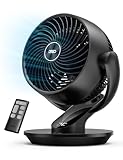
8. Dreo Fan for Bedroom, 13-Inch Oscillating Table Air Circulator Fan for Whole Room, 120° Tilt Adjustment, 28dB Ultra-Quiet, 70ft Powerful Airflow, 4 Speeds Desk Fans with Remote for Home, Office
Overview:
The Dreo 13-inch Air Circulator represents a premium approach to personal cooling, engineered for whole-room performance rather than just spot cooling. With advanced WingBoost technology, it projects airflow up to 70 feet while maintaining an ultra-quiet 28dB operation. This makes it suitable for bedrooms where silence is paramount, yet powerful enough for living rooms and offices.
What Makes It Stand Out:
The remote control and Auto Mode differentiate this from basic fans, automatically adjusting speed based on room temperature for set-it-and-forget-it comfort. The combination of 120° vertical tilt and 90° horizontal oscillation provides exceptional coverage versatility. At 853 CFM, it moves significantly more air than typical desk fans, while the 28dB noise level rivals premium white noise machines—quiet enough for undisturbed sleep.
Value for Money:
While priced higher than entry-level fans, the Dreo justifies its cost through superior engineering and convenience features. The remote alone adds significant value for bedroom use, eliminating midnight trips to adjust settings. Its whole-room capability means you might avoid purchasing a larger floor fan, and the energy-efficient operation offsets initial cost over time. Comparable performance from traditional brands often costs 30-50% more.
Strengths and Weaknesses:
Strengths include exceptional airflow distance, ultra-quiet operation, remote control convenience, Auto Mode intelligence, versatile tilt/oscillation, and easy cleaning. Weaknesses are the higher price point, larger footprint than basic desk fans, and potential overkill for those needing only personal cooling. The learning curve for advanced features may deter technophobes.
Bottom Line:
The Dreo 13-inch fan is ideal for those prioritizing quiet, powerful, whole-room cooling with modern conveniences. It’s worth the premium for light sleepers, parents, or anyone wanting remote-controlled comfort. While overkill for tiny spaces, it excels in medium-sized rooms where traditional desk fans fall short.
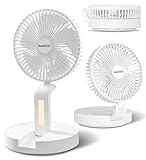
9. Geek Aire Personal Cooling Fan that Blow Cold Air, Portable Rechargeable Desk Fan with LED, Oscillating Standing Table Fans, Battery Powered Floor Fan for Bedroom, Travel, Dorm, Cruise RV Essentials
Overview:
The Geek Aire Personal Cooling Fan redefines portability with its innovative foldable design and cordless operation. Tailored for travelers, dorm dwellers, and cruise ship passengers, this fan collapses to one-third its size for easy packing while delivering 4.5 to 12 hours of runtime on its rechargeable battery. The integrated dimmable LED adds functionality as a night light, making it particularly suitable for late-night reading or nursery use.
What Makes It Stand Out:
The foldable mechanism is genuinely unique, transforming it from a standing floor fan to a compact travel companion in seconds. Cruise ship and RV approval addresses specific niche needs often overlooked by competitors. The combination of cordless freedom, oscillation, and LED lighting creates a versatile tool for everything from beach barbecues to dorm rooms. Wall-mounting capability maximizes utility in cramped spaces where floor space is premium.
Value for Money:
Priced in the mid-range for rechargeable fans, it offers strong value through multi-functionality. You’re essentially getting a desk fan, floor fan, travel fan, and night light in one package. The long battery life eliminates ongoing battery costs, and the durable design withstands travel rigors. For cruise or RV enthusiasts, it’s a specialized solution that justifies its price tag compared to buying separate devices.
Strengths and Weaknesses:
Strengths include exceptional portability, cordless operation, LED night light, oscillation, multiple mounting options, and travel-friendly design. Weaknesses are limited power compared to AC fans, charging time versus runtime ratio, and potential durability concerns with folding mechanisms over years of use. The aesthetic is functional rather than stylish, prioritizing utility over décor.
Bottom Line:
The Geek Aire is a must-have for frequent travelers, cruise-goers, and anyone needing flexible cooling without outlet dependency. Its unique foldability and LED feature set it apart from standard rechargeable fans. While not a primary home cooling solution, it excels as a portable companion that adapts to diverse environments from dorm rooms to campsites.
10. CIVPOWER Desk Fan: Table Fan Small Portable Rechargeable with 6000 mAh Battery - 4 Speed and Timing - Quiet Desktop 8 Inch Fan for Bedroom Room Dorm Office Air Circulation 270°Adjustable

Overview:
The CIVPOWER Desk Fan merges rechargeable convenience with exceptional adjustability, featuring a 6000 mAh battery that delivers up to 19 hours of cooling. Its 8-inch blade diameter hits a sweet spot between portability and performance, while the remarkable 270° adjustment (both vertical and horizontal) provides unprecedented directional control. Designed for year-round use, it pairs effectively with air conditioners in summer and heaters in winter for enhanced circulation.
What Makes It Stand Out:
The 270° adjustability is a standout feature, allowing users to direct airflow in virtually any direction without moving the entire unit. The 19-hour battery life leads its class, outlasting most competitors by 5-7 hours. At 24dB, it’s among the quietest fans available, rivaling premium sleep-focused models. The three-in-one design (tripod, stand, wall-mount) offers versatility that adapts from desktop to camping scenarios seamlessly.
Value for Money:
This fan offers premium features at a mid-range price point. The extended battery life alone provides significant value, reducing recharge frequency and enhancing usability during power outages or outdoor activities. When compared to single-use fans, its multi-season versatility and multiple mounting options effectively provide three products for the price of one. The brushless motor ensures longevity, protecting your investment.
Strengths and Weaknesses:
Strengths include exceptional battery life, ultra-quiet operation, unmatched adjustability, versatile mounting options, and timer functionality. Weaknesses are the 8-inch size limiting airflow volume, longer charging time for full battery, and potential stability issues at extreme tilt angles. The tripod must be purchased separately, adding hidden cost for full functionality.
Bottom Line:
The CIVPOWER fan is ideal for those seeking maximum flexibility and battery longevity in a compact package. It’s perfect for bedrooms, dorms, and outdoor enthusiasts who need reliable cordless cooling. While not the most powerful option available, its adjustability and near-silent operation make it a top contender for personalized comfort. The long battery life and quiet motor justify the investment for quality-focused buyers.
Why Portable Fans Are Essential for Modern Dorm Living
The Climate Control Challenges of Dorm Life
Dorm rooms present unique environmental obstacles that off-campus housing rarely replicates. Many residence halls operate on centralized HVAC systems that follow bureaucratic schedules rather than actual weather patterns, leaving you sweating through October heatwaves or shivering during April cold snaps. Window restrictions—whether due to safety protocols, limited opening ranges, or outright bans on AC units—eliminate the most obvious cooling solutions. Add in body heat from two occupants, electronics generating constant warmth, and the insulation properties of concrete construction, and you’ve got a perfect storm for stagnant, uncomfortable air. A strategically placed portable fan becomes your first line of defense, creating micro-breezes that make the difference between restful sleep and 3 a.m. frustration.
Health and Wellness Benefits of Proper Air Circulation
Beyond simple temperature management, consistent air movement significantly impacts your physical and mental well-being during high-stress academic periods. Proper circulation reduces allergen concentration by preventing dust, pollen, and mold spores from settling—crucial when you’re sharing recycled air with hundreds of other students. Studies show that optimal air quality improves cognitive function and concentration, directly translating to better study sessions and exam performance. The white noise generated by a quality fan masks disruptive hallway conversations, slamming doors, and your roommate’s irregular sleep schedule, promoting deeper, more restorative sleep cycles that are essential for memory consolidation and immune system function.
Understanding Different Fan Types for Dorm Use
Desk Fans: Compact Powerhouses
Desk fans represent the most versatile category for dorm applications, offering directable airflow within arm’s reach of your study space. Modern 2026 models typically feature brushless DC motors that deliver impressive airflow from 6-8 inch frames while consuming minimal desk real estate. Look for models with adjustable tilt heads that allow you to redirect airflow from your face during intense study sessions to your torso when you’re simply browsing your phone. The best desk fans offer multiple power options—USB-C for laptop-powered operation during the day and traditional AC plugs for overnight bedside use—giving you flexibility when outlet access is limited.
Tower Fans: Space-Saving Vertical Solutions
When floor space is at a premium but you need whole-room circulation, tower fans provide vertical airflow distribution that traditional designs can’t match. These slim units, typically 30-40 inches tall, oscillate to push air across the entire room rather than creating a single directional blast. Advanced models incorporate air multiplier technology, drawing in surrounding air to amplify output without increasing motor strain or noise levels. For dorm use, prioritize towers with remote controls or app connectivity—because nobody wants to navigate around furniture to adjust settings at 2 a.m. The narrow footprint easily tucks between your bed and wall or slides into closet corners during winter storage.
Clip-On Fans: Versatile Mounting Options
Clip-on fans solve the critical dorm dilemma: “Where do I put this thing?” These adaptable units attach to bed frames, desk edges, shelving units, or even closet rods, delivering targeted airflow exactly where you need it most. Modern versions feature silicone-padded clamps that grip securely without damaging furniture finishes—an important consideration when security deposits are on the line. The most useful clip-ons offer 360-degree rotation and multiple speed settings, allowing you to create a personal cooling zone whether you’re studying at your desk or binge-watching from bed. Battery-powered variants eliminate cord management headaches and work brilliantly for lofted beds where outlets remain frustratingly out of reach.
Personal Neck Fans: Hands-Free Cooling
The newest category revolutionizing dorm comfort, wearable neck fans have matured significantly by 2026. Gone are the awkward, loud prototypes of earlier years; current models feature dual turbine systems that wrap comfortably around your neck, directing airflow upward toward your face while maintaining whisper-quiet operation below 30 decibels. These are game-changers for students in older buildings without air conditioning, providing portable relief that moves with you from dorm to library to lecture hall. Look for models with bladeless designs for hair safety, adjustable air outlets to accommodate different neck sizes, and at least 8-10 hours of battery life to cover a full day of classes.
Box Fans: Classic Window Solutions
Despite technological advances, the traditional box fan maintains its relevance for dorm dwellers with window access. These units excel at creating powerful cross-ventilation when positioned in windows, actively pulling fresh air in or exhausting hot, stale air out depending on orientation. Modern iterations feature slimmer profiles, removable grilles for cleaning, and built-in thermostats that automatically adjust speed based on room temperature. For dorm approval, ensure any window fan includes secure mounting brackets and meets your residence hall’s specific safety certifications regarding electrical draw and stability.
Key Features to Evaluate in 2026 Models
Battery Life and Power Options
The most critical evolution in portable fans is hybrid power flexibility. Top-tier 2026 models offer lithium-ion batteries providing 12-24 hours of cordless operation on low settings, with USB-C fast charging that replenishes power in under 3 hours. This matters immensely during finals week when you’re camped in a library corner far from outlets, or during those inevitable campus power outages. Evaluate battery capacity in milliampere-hours (mAh)—10,000 mAh typically delivers overnight operation at medium speed. Simultaneously charging while operating is a must-have feature, ensuring your fan never dies during a critical moment.
Noise Levels: Finding Your Quiet Zone
Fan noise directly impacts sleep quality and study concentration, making decibel ratings a primary consideration. Quality dorm fans operate between 25-40 decibels on low settings—comparable to a whisper or quiet library. The sweet spot for sleep is under 30 decibels, while studying can tolerate up to 40 decibels as effective white noise. Be wary of manufacturers’ decibel claims; look for independent testing certifications or user reviews specifically mentioning noise levels. Brushless motors and aerodynamic blade designs significantly reduce mechanical hum, while rubberized bases prevent vibration against hard dorm surfaces.
Airflow Power and Speed Settings
Airflow measurement, typically listed in cubic feet per minute (CFM), determines actual cooling effectiveness. For personal desk use, 200-400 CFM suffices, while whole-room circulation requires 500+ CFM. More important than raw power is granularity of control—seek fans with at least 4-6 speed settings rather than basic low/medium/high options. This allows fine-tuning for different activities: gentle breeze for sleeping, moderate flow for studying, and maximum power for post-gym cooldowns. Some advanced models feature “natural wind” modes that vary speed randomly, mimicking outdoor breezes and preventing the fatigue caused by constant airflow.
Smart Connectivity and App Integration
In 2026, smart features have become standard rather than premium additions. Wi-Fi enabled fans connect to campus networks (where permitted) or create their own local hotspots, allowing smartphone control of speed, oscillation, and scheduling. The most useful integration is temperature-triggered automation—fans that activate when your room hits a specific temperature, working in conjunction with smart thermostats or standalone sensors. Voice control through popular assistants provides hands-free operation when you’re buried in textbooks. Ensure any smart fan offers an offline manual mode for times when networks are unreliable or you’re conserving phone battery.
Oscillation and Directional Control
Fixed-position fans create uncomfortable direct drafts, while oscillation distributes cooling throughout the room. Modern oscillation mechanisms have improved dramatically, offering wider angles (up to 120 degrees) and smoother, silent rotation without the clicking sounds of older models. For maximum versatility, look for fans combining horizontal oscillation with vertical tilt adjustment—this lets you direct airflow upward to circulate rising warm air or downward for direct cooling. Some premium models feature “spot cooling” modes that pause oscillation at specific angles, maintaining airflow on your bed while avoiding your roommate’s desk area.
Size and Space Considerations
Measuring Your Dorm Layout
Before selecting any fan, physically map your space constraints. Most dorms provide under 200 square feet of living area, with furniture arrangements that leave minimal clearance. Measure desk depth—if under 24 inches, a large desk fan will dominate your workspace. Check bed height; lofted beds above 5 feet require clip-on or tower solutions since desk fans can’t project air that high. Identify outlet locations and count available plugs; power strip availability impacts whether you need USB-powered options. Create a simple floor plan sketch noting windows, doors, and furniture placement to visualize where airflow will be most effective.
Storage Solutions During Off-Season
Dorm rooms lack storage, making fan portability and compactness crucial for winter months when heating replaces cooling needs. Collapsible designs that fold flat or disassemble easily store under beds or atop wardrobes. Tower fans with detachable bases reduce height by 30% for closet storage. Consider models that serve dual purposes—some desk fans incorporate phone holders or small storage compartments, justifying their year-round presence. For truly seasonal storage, original packaging often provides the best protection against dust; keep boxes flattened under your bed for easy retrieval.
Portability Factors: Weight and Handles
Your fan will likely travel beyond your dorm—to the library for all-nighters, to outdoor study spaces, or home during breaks. Weight becomes a significant factor; ideal portable units range from 1-3 pounds for personal fans to 5-7 pounds for tower models. Integrated carrying handles or ergonomic grips make transport less awkward, while cord management features like wrap-around cable storage prevent tangling in backpacks. Battery-powered models eliminate the need to pack adapters, though ensure they include protective cases or covers to prevent damage during transit.
Power and Energy Efficiency
USB-C vs. Traditional Plug-In Models
The universal adoption of USB-C has revolutionized fan power options. USB-C fans draw power from laptops, power banks, or wall adapters, offering unmatched flexibility in outlet-scarce dorms. However, verify power delivery specifications—some laptops limit USB-C output, causing fans to operate at reduced speed. Traditional AC plug-ins deliver consistent performance but compete for limited wall outlets. The optimal solution is hybrid models featuring both USB-C and AC inputs, automatically switching between sources based on availability. For maximum efficiency, choose fans with Energy Star certifications, ensuring they consume minimal electricity—critical when you’re splitting utility costs or facing campus energy restrictions.
Battery Capacity for Cordless Operation
Battery technology improvements mean cordless fans are now viable primary cooling sources rather than backup options. Lithium-polymer batteries offer the best weight-to-capacity ratio, with 20,000 mAh units providing 24+ hours on low settings. Fast-charging capabilities (PD 3.0 or higher) recharge batteries to 80% in under an hour—perfect for quick top-ups between classes. Consider pass-through charging, which allows fan operation while charging without battery damage. For safety, verify batteries include overcharge protection and meet airline carry-on regulations if you’ll fly home for holidays. Some models feature removable batteries, letting you swap in spares for truly unlimited cordless use.
Eco-Friendly Energy Consumption
Sustainability matters to environmentally conscious students and budget-aware ones alike. Modern efficient fans consume 5-15 watts on medium settings—less than a single LED bulb. Solar-assisted charging panels, while not primary power sources, provide emergency top-ups for battery models placed in sunny windows. Sleep timers and auto-shutoff features prevent wasted energy when you drift off. Some advanced fans include eco-modes that automatically reduce speed as room temperature drops, maintaining comfort while minimizing consumption. These features not only reduce your carbon footprint but also prevent circuit overloads in aging dorm electrical systems.
Smart Features and Tech Integration
Voice Control Compatibility
Hands-free operation proves invaluable when you’re elbow-deep in textbooks or crafting late-night essays. Fans compatible with major voice assistants respond to commands like “set fan to sleep mode” or “increase speed by 20%.” This integration extends beyond simple on/off functions; create routines like “study mode” that sets specific speed and oscillation patterns. For shared dorms, voice recognition can restrict control to registered users, preventing prankster roommates from blasting you with air at 3 a.m. Ensure privacy settings allow you to disable microphones when desired, addressing legitimate surveillance concerns in close living quarters.
Scheduling and Automation
Programmable scheduling transforms your fan from passive appliance to active climate manager. Set different speeds for morning wake-up (gentle breeze at 7 a.m.), afternoon studying (steady airflow), and overnight sleep (quiet, low-speed operation). Temperature-based triggers automatically increase speed as room temperature rises, maintaining consistent comfort without manual adjustment. Humidity sensors can activate higher speeds during muggy days, preventing that sticky dorm feeling. The most sophisticated systems learn your schedule over time, anticipating when you’ll return from class and pre-cooling your room accordingly.
Air Quality Monitoring Integration
Premium 2026 fans increasingly incorporate air quality sensors that detect particulates, VOCs, and CO2 levels—common issues in poorly ventilated dorms. When air quality degrades, these fans automatically increase circulation to dilute contaminants, potentially alerting you to open windows or report maintenance issues. Integration with campus HVAC systems (where supported) allows your fan to complement central air rather than working against it. While not a replacement for dedicated air purifiers, this feature provides valuable environmental awareness, especially for students with allergies or asthma navigating shared living spaces.
Safety Features for Dorm Environments
Bladeless Designs and Finger Guards
Dorm safety regulations often mandate specific fan designs, particularly bladeless or fully enclosed models. Bladeless fans (using air multiplier technology) eliminate spinning blades entirely, making them intrinsically safe for curious fingers, loose clothing, and errant textbooks. For traditional bladed models, finger guards must have spacing under 5mm to prevent digit insertion—check for compliance with UL 507 safety standards. Removable grilles should require tools for access, preventing impulsive cleaning attempts while the unit is plugged in. These features aren’t just regulatory; they provide peace of mind when you’re operating fans near bunk beds or while sleep-deprived.
Automatic Shut-Off Mechanisms
Overheat protection automatically powers down fans when internal temperatures exceed safe thresholds, preventing motor burnout and fire risks—critical in older residence halls with suspect wiring. Tip-over switches instantly cut power if the fan falls, essential for top-bunk clip-ons or desk edges. Timer-based auto-shutoff prevents all-night operation when you only need an hour of cooling to fall asleep. Some models include motion sensors that deactivate when you leave the room, conserving energy and eliminating the “did I leave my fan on?” anxiety during back-to-back classes. These mechanisms should be mechanical failsafes, not software-dependent, ensuring they work even during smart feature malfunctions.
Fire Safety Certifications
Residence life offices strictly enforce fire safety standards, often requiring ETL or UL certification for all electrical devices. Verify your fan bears these marks, indicating it has passed rigorous testing for electrical safety, flammability of materials, and stability. Some campuses maintain approved device lists; check before purchasing to avoid move-in day confiscations. Fire-resistant housing materials (ABS plastic rated V-0 or higher) won’t contribute to flame spread. Power cords should be thick-gauge (18 AWG or lower) with strain relief at both ends to prevent fraying—damaged cords represent the most common fire hazard in dorms.
Aesthetic and Design Choices
Color Options to Match Your Decor
Gone are the days of industrial beige being your only option. Contemporary fans arrive in palettes ranging from minimalist whites and blacks to vibrant teals, corals, and matte pastels that complement your bedding and wall art. Some manufacturers offer interchangeable faceplates or grille covers, allowing you to update appearance semester-to-semester without buying a new unit. Consider finishes that resist fingerprints and dust visibility—matte textures hide dorm grime better than glossy surfaces. Color-changing LED bases provide ambient lighting that syncs with your mood or study schedule, serving dual functional and decorative purposes.
Minimalist vs. Statement Designs
Your fan can either blend into the background or serve as a conversation piece. Minimalist designs feature clean lines, hidden controls, and monochromatic finishes that disappear into your aesthetic. These work best in already-cluttered spaces where visual calm is precious. Conversely, statement fans embrace bold geometric shapes, exposed mechanical elements, or retro designs that reflect personal style. A fan that looks like modern sculpture justifies its footprint by contributing to room personality. Consider your overall decor approach: if you’re going for serene study sanctuary, minimalist wins; if your room is an expression of maximalist creativity, let your fan join the visual party.
Customizable LED Lighting
Integrated lighting transforms fans into multi-functional dorm accessories. Soft-glow LEDs around the base provide enough illumination for midnight bathroom trips without waking your roommate. Some models display temperature, time, or even motivational messages on LED screens built into the housing. RGB customization lets you coordinate colors with holidays, exam periods (red for finals week stress), or campus events. Crucially, these lights should be independently controllable—being able to disable them during sleep prevents your fan from becoming a nuisance nightlight. Look for models with “stealth mode” that dims all indicators for zero-light pollution sleeping environments.
Budget Planning and Value Assessment
Understanding Price Ranges
Portable fan prices in 2026 span from $15 basic clip-ons to $200+ smart tower systems with air purification. Establish your budget by calculating cost-per-use: a $80 fan used 8 hours daily for two semesters costs about $0.03 per hour. Mid-range options ($40-70) typically offer the best balance of features, durability, and performance for most dorm needs. Avoid ultra-cheap models under $20—they often use brushed motors that become noisy within weeks and lack safety certifications. Premium pricing justifies itself through energy savings (efficient motors pay for themselves over time), extended warranties, and multi-functionality that replaces several devices.
Warranty and Durability Considerations
College life is hard on electronics; your fan will endure transport, spills, and occasional drops. Seek manufacturers offering at least 2-year warranties, indicating confidence in build quality. Check warranty terms specifically for dorm-related damage—some policies exclude “misuse” that could be interpreted as typical college abuse. User-replaceable parts (motors, batteries, grilles) extend lifespan beyond the warranty period. Metal construction in high-stress areas (base, pivot points) outlasts all-plastic designs that crack under pressure. Read user reviews focusing on longevity; patterns of motor failure after six months reveal manufacturing defects that marketing materials won’t disclose.
Long-Term Cost of Ownership
Initial purchase price tells only part of the story. Calculate energy costs: a 10-watt fan running 8 hours daily costs roughly $3-5 per semester in electricity, while inefficient 30-watt units triple that expense. Battery replacement adds $15-30 annually for models with non-replaceable batteries that degrade. Cleaning maintenance requires time investment; models with tool-free disassembly save frustration and ensure you’ll actually clean them, extending motor life. Consider resale value—premium brands retain 40-60% of value on campus marketplaces, while budget options become disposable. A $80 fan you resell for $40 after two years effectively costs less than a $30 fan that breaks and gets trashed.
Maintenance and Care Tips
Cleaning Different Fan Types
Dorm dust accumulates at alarming rates, clogging fan motors and reducing efficiency. Bladeless fans require simple wipe-downs of the ring interior with a damp cloth weekly. Traditional bladed models need monthly deep cleaning: remove grilles (most 2026 designs use twist-lock mechanisms requiring no tools), wash blades with mild soap, and vacuum motor housings to clear dust bunnies. For tower fans, compressed air cans blow debris from internal columns without disassembly. Never submerge electrical components; use barely-damp cloths only. Establish a cleaning schedule synced to your laundry day—clean fan while clothes wash—to maintain consistent performance and prevent that embarrassing “dust blast” when first turning on a neglected unit.
Storage Best Practices
At semester’s end, proper storage prevents damage and ensures your fan survives summer humidity. Clean thoroughly before storage to prevent mold growth on dust residue. For battery models, charge to 50-60% (not full) to maximize battery lifespan during extended disuse. Store in original packaging or breathable fabric bags—never plastic that traps moisture. Place silica gel packets inside to absorb humidity. Store upright to prevent motor bearing stress, in climate-controlled areas if possible (not sweltering attics). For tower fans, remove bases to reduce height and store components together in labeled bags. Document your fan’s condition with photos before storage; this provides evidence if damage occurs and you need warranty claims.
Troubleshooting Common Issues
When your fan malfunctions mid-heatwave, basic troubleshooting saves time and money. If fan won’t turn on, check for reset buttons on the plug (common in GFCI-protected dorms) and test outlets with phone chargers to rule out electrical issues. Unusual noise often indicates loose blades or debris—power off, inspect visually, and tighten any accessible screws. Weak airflow usually signals clogged grilles; clean immediately. For smart fans, connectivity issues resolve with simple resets: hold power button for 10 seconds, forget device in your app, and re-pair. If oscillation stops working, check for physical obstructions and ensure the unit sits level—most mechanisms disable automatically when tilted to prevent motor strain. When all else fails, manufacturer customer service often provides video chat support to diagnose issues without requiring returns.
Frequently Asked Questions
What size fan is best for a typical dorm room? For standard 12x15 foot dorm rooms, a tower fan around 36 inches tall or a desk fan with 8-inch blades provides optimal circulation without overwhelming the space. Measure your specific layout first, focusing on available floor or desk space rather than room dimensions.
Are battery-powered fans powerful enough for all-night use? Yes, modern 2026 battery fans with 10,000+ mAh capacity deliver 8-12 hours on medium settings. Choose models with sleep modes that gradually reduce speed to conserve power while maintaining comfort throughout the night.
Can I use a fan with my dorm’s Wi-Fi network? Most smart fans support standard 2.4GHz networks common in dorms. However, some campus networks require device registration through a portal, which may not work with fan interfaces. Check with your IT department or opt for fans with offline manual controls as backup.
How do I clean my fan without voiding the warranty? Most 2026 warranties allow user cleaning of accessible parts. Avoid opening sealed motor housings. Use manufacturer-recommended methods: typically wiping blades and grilles with damp cloths. Document cleaning with photos to prove proper maintenance if warranty issues arise.
What’s the ideal noise level for sleep? Aim for fans operating at 25-30 decibels on low settings—comparable to a whisper. Test fans in-store if possible, or read reviews specifically mentioning sleep use. Avoid models above 40 decibels for overnight operation.
Are bladeless fans worth the extra cost for dorms? Bladeless designs offer superior safety, easier cleaning, and modern aesthetics that justify their 20-30% price premium. For lofted beds or tight spaces where fingers might contact grilles, the safety advantage alone makes them worthwhile.
Can one fan cool both me and my roommate? Oscillating tower fans can provide shared cooling if placed centrally. However, individual preferences vary greatly. Consider a compromise: a larger shared fan for general circulation plus small personal fans for each bed, balancing collective comfort with individual control.
How much should I expect to spend on a quality dorm fan? Plan $50-80 for a reliable, feature-rich fan that will last your entire college career. Budget $30-40 for basic but safe models, or $100-150 for premium smart fans with advanced features. Avoid under $20 options that lack safety certifications.
Do fans help with dorm room odors? Fans don’t eliminate odors but significantly improve air circulation, preventing smells from concentrating. Position fans near windows to exhaust stale air or use them to distribute air purifier output. Some 2026 models include ionizers that modestly reduce odor particles.
What safety features are mandatory for dorm approval? Most residence halls require UL or ETL certification, tip-over protection, and finger-safe grilles (under 5mm spacing). Check your specific school’s housing guidelines before purchasing, as some maintain additional restrictions on battery capacity or wattage.
See Also
- 10 Best Portable Fans After 6 Months of Testing in 2026
- How to Solve Overheating Rooms with the 10 Best Portable Heat and Cool Units in 2026
- How to Choose the 10 Best Cooling Fans for Kids’ Rooms in 2026
- How to Solve Overheating Rooms with the 10 Best Portable Air Coolers in 2026
- 10 Best Heating Fans for Drafty Rooms in 2026